🚀 Intro: Why This Guide Exists
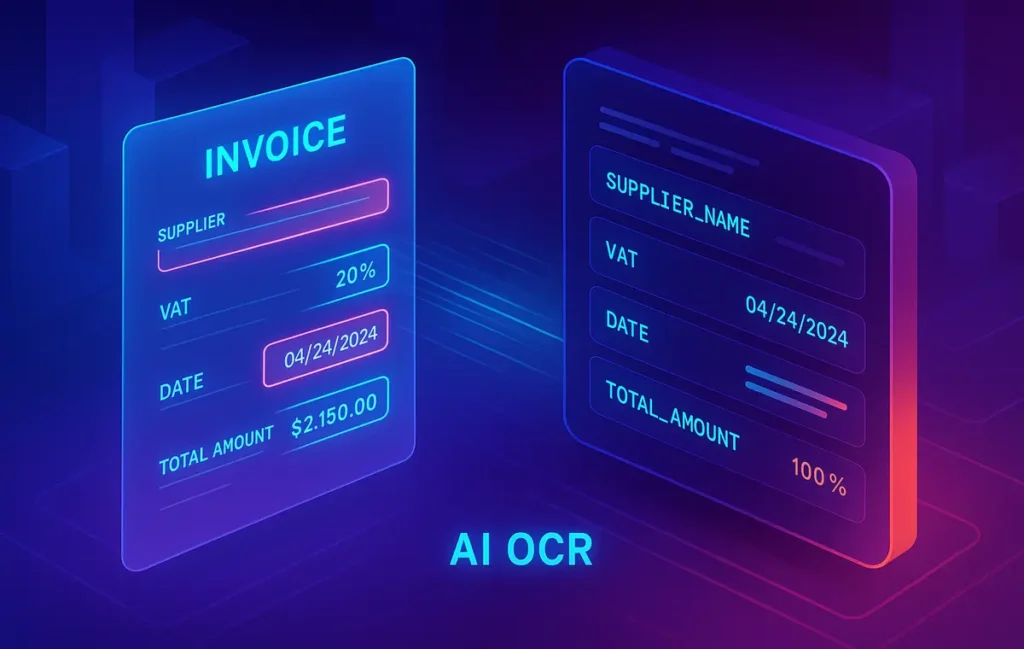
Manual invoice entry is the definition of slow, error-prone work. Totals get transposed, VAT lines disappear, and dates hide in unfamiliar formats. Finance and operations teams lose hours chasing vendor names, mis-typed purchase order numbers, and inconsistent tax logic. In 2025 there’s finally a better way: optical character recognition (OCR) fused with domain-specific AI that doesn’t just read pixels, it understands invoices—where supplier names live, how totals relate to line items, and which numbers must reconcile. This isn’t a sci-fi promise. Modern platforms turn PDFs, scans, and phone photos into structured data that your accounting software or ERP can trust.
This guide focuses narrowly on the OCR and data extraction layer: detection, field parsing, accuracy benchmarks for VAT/tax, totals, dates, and suppliers; multi-format input (PDF/JPG/PNG); and AI error correction/validation. Downstream automation—posting, approvals, payment runs, reminders—belongs in your broader AP playbook and is covered in How to Automate Invoice Management. If you’re mapping the whole document pipeline, keep Best Document Automation Software and Smart Document Processing handy; if you’re starting at the very first step (turning a PDF into tables and fields), see PDF OCR to Structured Data. NerdChips’ goal here is pragmatic: give you a 2025-ready mental model, tool choices, and a field-tested workflow you can deploy in days—not quarters.
💡 Nerd Tip: Keep this post scoped to OCR and extraction. Treat approvals, coding, and payments as separate automations you’ll connect later. Focus wins.
📈 Why Invoice Scanning Still Matters in 2025
Invoice volume is rising across every business size because purchasing has decentralized. Teams subscribe to SaaS with company cards, logistics partners issue mixed-format bills, and global suppliers bring diverse templates and languages. Each of those quirks becomes friction during month-end close. Even if you already run a modern AP system, the first bottleneck is still getting accurate, structured data from whatever the supplier sent.
Regulatory pressure also pushes precision. VAT/GST regimes change frequently, e-invoicing standards expand, and auditors increasingly expect traceable extraction—not just a CSV—but a verifiable, versioned record of what the system read and why. The hidden cost of manual entry isn’t just time; it’s the rework when totals don’t reconcile with line taxes or when a supplier’s legal name on the invoice doesn’t match your vendor master. Multiply those little issues by hundreds or thousands of invoices a month and you have a measurable drain on cash flow timing and team morale.
The 2025 difference is that OCR has matured from “text detection” into document intelligence. Instead of brittle templates that break with every design tweak, modern systems combine layout parsing, language models, and business rules. That combo recognizes that an invoice is not a page of text but a graph of fields and relationships. In practice, this means more first-pass accuracy, fewer exceptions, and tighter reconciliation—especially for VAT, totals, and dates that used to ping-pong between AP and procurement.
💡 Nerd Tip: If you can’t measure extraction errors by field (VAT, total, date, supplier), you can’t improve them. Instrument your process before you switch tools.
🧠 How AI Invoice OCR Works (Simplified)
At a high level, the pipeline has three layers: OCR, AI post-processing, and the integration layer.
The OCR layer converts pixels into characters. Traditional engines segment the page (detect text blocks, tables, and lines) and recognize glyphs. The best systems now use vision-transformer models that are robust to skewed photos and low-contrast scans. If you support mobile capture, this is where de-skew, denoise, and perspective correction matter; a good pre-process can lift character accuracy dramatically, especially on thermal receipts and faint fax scans.
The AI post-processing layer turns raw text into fields. It detects anchors (“Invoice”, “Bill to”, “PO #”), infers context from layout, and uses language models to label entities like supplier names, currency codes, addresses, VAT rates, and line items. Crucially, it also validates relationships: totals must equal subtotals + tax + shipping ± discounts; invoice dates must make sense vs. due terms; supplier VAT ID must match the country formatting. Think of this step as accounting-aware NLP—it doesn’t just extract, it checks.
The integration layer packages the results for your systems: JSON for your middleware, or direct API into ERP/accounting (e.g., posting to QuickBooks, Xero, SAP, NetSuite). This is also where you map supplier names to your vendor master and normalize currencies. For governance, the layer should capture human-in-the-loop validation events as first-class data: who corrected what and why. That audit trail is gold when something looks off in a later reconciliation.
💡 Nerd Tip: Ask vendors how they reconcile totals. If they only sum parsed numbers without reasoning about discounts, freight, or rounding, expect fragile outputs.
🥇 Top AI Invoice OCR Tools (Mini-Reviews You Can Act On)
Notes on accuracy: real-world performance depends on scan quality, language, layout diversity, and your validation rules. Use the ranges here as directional and run your own pilot with your documents.
ABBYY Vantage / FlexiCapture — The seasoned specialist with on-prem and cloud options
ABBYY is a veteran in document capture. In 2025, its Vantage (cloud) and FlexiCapture (on-prem) offerings remain strong when you need enterprise controls, high language coverage, and deep tuning. The extraction is layout-aware and the marketplace “skills” for invoices give you a head start across common formats. A strength is explainability: you can inspect confidence by field and wire that into human-in-the-loop queues. In mixed invoices (multi-currency, multi-language), it stays stable. Expected extraction on VAT/total/date/supplier in clean scans often lands in the 93–97% first-pass accuracy band with well-designed validation.
Weaknesses are the learning curve and licensing complexity. FlexiCapture’s on-prem story is a plus for privacy-heavy industries, but it does mean more ops work. If your team prefers a managed service with less tuning, a lighter cloud-first tool may ship faster.
Rossum — Modern UI + AI-first extraction with robust validation loops
Rossum’s core value is a clean review UX and AI that learns from your corrections. Invoices that drift from standard templates still parse reliably, and the platform’s “elastic” document model handles strange layouts without brittle templates. We like its validation rules—you can encode business logic (e.g., country-specific VAT checks) that catch mistakes the model might miss. On typical Western-language invoices, first-pass for totals/dates/supplier often sits around 92–96%, with VAT a little lower in jurisdictions with complicated tax layouts; the review loop helps close the gap quickly.
Caveats: Rossum is cloud-centric; if you need strict on-prem processing, you’ll look elsewhere. Complex line-item parsing with many nested discount fields sometimes needs custom rules or a small post-processor.
UiPath Document Understanding — End-to-end with robots attached
If your organization already runs UiPath, Document Understanding is a strong invoice OCR choice. You combine OCR engines with ML extractors and surface validation in an Action Center for humans. The advantage is orchestration: once extraction is good, you can kick off downstream automations without leaving the ecosystem. Expect first-pass field accuracy in the 90–95% band on mixed inputs, with the ML model improving as you label exceptions. Language coverage and on-prem deployment options are robust for enterprise buyers.
Trade-offs include ramp time (you’ll design a pipeline) and license complexity. For a small finance team without RPA, this can feel heavy; for a scaled ops shop, it’s ideal.
Hyperscience — Human-machine collaboration built in
Hyperscience leans hard into human-in-the-loop and model training with real operator feedback. That design makes it attractive where you need predictable SLAs and measurable quality. Invoices with messy scans, stamps, or handwriting are where it shines more than most. We’ve seen consistent 92–96% first pass on totals/dates/supplier across diverse sources; VAT performance depends strongly on your rule set, which you can tighten centrally.
You do trade some out-of-the-box speed for long-term control. For a pilot, allocate time to design your validation/exception taxonomy so you actually learn from errors.
Cloud AI stacks (Google Document AI, Azure AI Document Intelligence, AWS Textract) — Fast to pilot, deep to integrate
The hyperscalers offer invoice parsers with growing language support and well-maintained APIs. They excel when you already live on the provider and want to keep data gravity close to your warehouse/ETL. In clean PDFs, extraction is impressive; in phone photos, quality depends on your pre-process. First-pass accuracy sits ~90–95% on common fields with proper validation, and you can chain extra reasoning (e.g., custom functions in Cloud Run/Azure Functions/Lambda) to enforce business rules.
Downside: UX for human review is minimal (by design). You’ll either integrate a third-party validation UI or build a lightweight one. If you need on-prem, these aren’t your pick.
Veryfi / Klippa / Nanonets — SMB-friendly, quick wins
These cloud tools prioritize ease of setup and price transparency. Upload a batch, get structured fields with minimal configuration. For many SMEs they hit the sweet spot: “good enough” accuracy on totals/dates/supplier, basic VAT logic, and dead-simple exports to Excel or straight into QuickBooks/Xero. Expect 88–94% first-pass accuracy depending on layout messiness; add a short validation step for VAT and you’ll be production-ready fast.
The trade-off is depth: advanced line-item parsing, exotic languages, strict privacy controls, or gnarly custom validation usually push you toward enterprise tools.
💡 Nerd Tip: “Accuracy” means nothing without field-level metrics. Insist on per-field confidence and error rates (VAT, total, date, supplier, currency). Aggregate accuracy hides costly misses.
🧮 Comparison Table: Formats, Accuracy, and Deployment Snapshot
| Tool | Accuracy (VAT/Total/Date/Supplier)* | Supported Formats | Integration | Pricing | Cloud vs On-Prem | Languages |
|---|---|---|---|---|---|---|
| ABBYY Vantage / FlexiCapture | 93–97% with rules | PDF/JPG/PNG + multipage | ERP/Accounting connectors + APIs | Tiered/enterprise | Both | Broad (EU/Asian scripts strong) |
| Rossum | 92–96% with active learning | PDF/JPG/PNG; email inbox | APIs + iPaaS; solid review UI | Subscription per doc | Cloud | Strong European coverage |
| UiPath Document Understanding | 90–95% improving w/ labels | PDF/JPG/PNG; scanned/faxed | Deep RPA + ERP connectors | License bundles | Both | Wide; on-prem friendly |
| Hyperscience | 92–96% with HITL | PDF/JPG/PNG; tricky scans | APIs; operator console | Enterprise | Both | Broad; ops-grade QA |
| Google / Azure / AWS | ~90–95% on clean inputs | PDF/JPG/PNG; batch APIs | Native cloud + serverless | Usage-based | Cloud | Expanding quickly |
| Veryfi / Klippa / Nanonets | 88–94% typical | PDF/JPG/PNG; mobile apps | QuickBooks/Xero; CSV/Excel | SMB-friendly | Cloud | Common EU/US languages |
* Directional ranges for first-pass extraction; your mileage will track with scan quality, language, and validation rules.
💡 Nerd Tip: Always run an OPP (Own Pilot Pack): 50–200 recent invoices that represent your ugliest reality—photographs, stamps, multi-currency, and edge-case templates.
⚡ Ready to Build Smarter Workflows?
Explore AI workflow builders like HARPA AI, Zapier AI, and n8n plugins. Start automating in minutes—no coding, just creativity.
🧰 Workflow Playbook (Real-World, Minimal Drama)
A solid invoice-OCR deployment is a four-lane highway: capture → extract → validate → export. The trick is to make each lane observable and reversible.
Start by normalizing capture. Route PDFs and photos into a single intake—secure email inbox, SFTP, or mobile app. If phone photos are part of your flow, enforce capture hints (flat surface, edge detection, auto-crop). From there, hand everything to your OCR engine with pre-processing turned on: de-skew, noise reduction, and contrast fixes buy you easy accuracy points.
Extraction should output a structured schema: supplier legal name, supplier tax ID, invoice number, issue date, due date, currency, line items (description/qty/price), subtotals, discounts, VAT rates/amounts, shipping, grand total. The AI layer then runs field validation: totals must reconcile, VAT math must match rate and base, dates must align with terms, and supplier fields must map to your vendor master (ideally via a normalized ID).
Now add human review only where it pays. Set confidence thresholds per field—if VAT or supplier name falls below a certain confidence, it pops into a queue; otherwise it flows straight to export. Present reviewers with the field value, a crop of the original region, and the relevant math (e.g., “19% of 1200 = 228, invoice shows 228”). One glance, one click.
Export pushes a clean payload into Excel/CSV for audits, and into your ERP or accounting system through a connector/API. Archive the original PDF and the JSON + validation audit in cheap storage. When auditors ask “how did you get this number?”, you’ll answer with a single record.
A small trading firm we worked with processed ~1,000 invoices a month across three currencies and five template families. After moving to a cloud OCR with simple rules for VAT and totals reconciliation, the team cut median processing time by roughly half and reduced human touches to about one in four invoices (mostly new vendors or low-quality scans). Month-end stopped slipping; the controller stopped weekend triage.
💡 Nerd Tip: Version everything—your extraction schema, validation rules, and even the model release. If numbers change after an update, you’ll know why.
🧨 Common Pitfalls & How to Avoid Them
The first trap is non-standard layouts. Vendors love creativity; your parser doesn’t. Template-free models help, but you’ll still want a training set across your top 10 suppliers and a plan for long-tail documents. Capture diverse examples: credit notes, foreign language, landscape orientation, and invoices with stamps or QR codes that obscure totals. Use those to warm up any vendor model that supports incremental learning, or build post-processors that key off robust anchors (e.g., tax labels in local language).
The second pitfall is VAT math. OCR can read numbers perfectly yet still misattribute which line belongs to which rate. Solve this with rule-based validation: compute VAT from base × rate for each line, roll up, and compare to declared totals within a small tolerance for rounding. If the mismatch exceeds the tolerance, force review. Add country-specific patterns for tax IDs to drop false positives early.
Third, date chaos. “03/04/2025” means different things depending on locale. Normalize with locale-aware parsers and sanity checks (due date should not precede invoice date; terms should produce a plausible due date).
Fourth, supplier identity drift. A legal entity might trade under a different brand on the invoice. Fuzzy matching is tempting but dangerous. Maintain a vendor alias table and map extracted strings to normalized vendor IDs. Confirm with VAT ID, address snippets, or IBAN when present.
Finally, privacy and compliance. If your documents include PII or sensitive transaction data, you may need on-prem processing or a GDPR-compliant cloud with data residency controls. Even in the cloud, minimize retention and mask sensitive fields in logs. A quick DPIA (data protection impact assessment) upfront prevents expensive re-work later.
💡 Nerd Tip: Think “guardrails, not gates.” Use rules to highlight suspicious items, not to block the whole batch. You’ll fix the 5% without punishing the 95%.
🧭 Implementation Checklist
-
Define field-level metrics (VAT/total/date/supplier accuracy, first-pass rate, touch rate).
-
Build an OPP: 50–200 invoices reflecting your worst reality.
-
Run a 2–3 tool bake-off with the same OPP and the same validation rules.
-
Instrument human-in-the-loop with per-field confidence and image crops.
-
Wire exports to both Excel/CSV and your ERP/accounting API.
-
Archive original + JSON + validation log for audit.
-
Schedule monthly error reviews; update rules and alias tables.
💡 Nerd Tip: Your first month is about stability, not heroics. Favor fewer exceptions over chasing 100% automation on Day 1.
🔍 Mini-Reviews Recap (Who should pick what?)
If you need on-prem or a hybrid deployment with deep language support and industrial-grade templates, ABBYY remains a safe bet. If your team wants a cloud-first experience with strong review UX, Rossum is a top choice. If you already run UiPath robots, Document Understanding lets you stitch extraction into broader automations seamlessly. If you want operator-centric quality with measurable learning, Hyperscience is built for it. If you’re an SMB on a deadline, Veryfi/Klippa/Nanonets will get you 80–90% of the way this week with clear pricing. And if your stack lives on a hyperscaler, Google/Azure/AWS invoice parsers offer quick pilots and clean integration to your data lake.
For adjacent decisions—beyond OCR—bookmark Tools to Automate Data Entry and Eliminate Spreadsheets to connect extraction with downstream workflows, and scan Smart Document Processing for architectural patterns that age well.
📬 Want More Smart AI Tips Like This?
Join our free newsletter and get weekly insights on AI tools, no-code apps, and future tech—delivered straight to your inbox. No fluff. Just high-quality content for creators, founders, and future builders.
🔐 100% privacy. No noise. Just value-packed content tips from NerdChips.
🧠 Nerd Verdict
Invoice OCR in 2025 is no longer a gamble. The winning pattern blends a strong recognizer with accounting-aware validation and a lightweight human review loop. Get those three pillars right and you’ll see fewer exceptions, faster month-ends, and a quieter AP inbox. Don’t chase mythical 100% automation on Day 1; chase predictable accuracy and a system that learns. That’s the NerdChips approach—build sturdy rails first, then go faster.
❓ FAQ: Nerds Ask, We Answer
💬 Would You Bite?
If you could cut invoice processing time in half and still improve VAT accuracy, would you pilot an AI OCR this month?
Tell us your monthly volume and ERP. 👇
Crafted by NerdChips for finance teams and operators who want clean data to move at the speed of business.