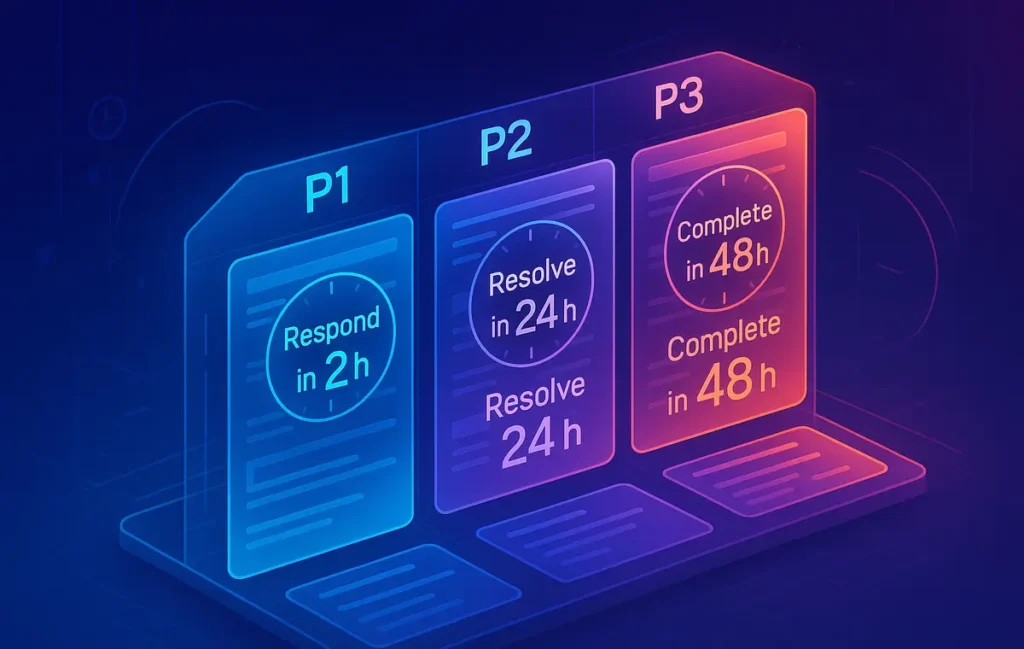
A task triage SLA method gives every task a “service window” (P1/P2/P3) with clear response and resolution times. Instead of guessing priorities all day, you assign a window once, route work into it, and let your calendar and energy decide when to execute. Less drama, more predictability.
🎣 Why Most Productivity Systems Fail at Triage
Most productivity failures don’t happen because tasks are technically difficult. They happen because tasks sit in a vague “I’ll get to it soon” cloud, with no clear commitment on when you’ll respond or when you’ll finish. Your brain tries to re-triage everything every hour, and you end up doing whatever is screaming the loudest.
On paper, you may already have a neat setup. Maybe you’ve built a solid base using something like your own custom workflow from How to Set Up a Productivity System That Actually Works. You might even combine time blocking, a to-do app, and a calendar. But when ten things show up in the same day, everything gets thrown into the same “ASAP” bucket. That’s where systems crumble.
Service Level Agreements (SLAs) solve this problem in high-availability environments: dev teams, support teams, operations. Instead of arguing about “importance,” they define response and resolution windows. Not “do it now” but “respond within 2 hours, resolve within 48 hours.” That subtle shift removes emotion and creates predictable expectations.
💡 Nerd Tip: When your brain wants to say “this is important,” force it to say “this is P1 within X hours” instead. It has to become concrete, or it doesn’t count.
The goal of this post is to bring that SLA mindset into personal productivity, especially if you’re an overloaded solopreneur or knowledge worker who constantly juggles client work, creative projects, and admin. By the end, you’ll have a practical SLA-based triage template you can copy into your app of choice and reuse daily.
🧭 Why SLA Thinking Works for Personal Productivity
SLA thinking is powerful because it shifts the conversation from “how important is this?” to “what service commitment am I willing to make?” That removes a lot of guilt and ambiguity.
First, SLAs remove emotional priority-setting. Instead of staring at a list and feeling vaguely bad about what you’re not doing, you map each item to a specific window: respond within 15 minutes, 2 hours, 24 hours, or this week. The moment you assign that, the internal anxiety drops. You’ve made a promise—clear, limited, and realistic.
Second, SLAs create predictable execution windows. If you decide that P1 tasks must be acknowledged within 30 minutes and resolved the same day, then you also implicitly decide that P3 tasks won’t jump the queue. That means your deep work blocks—say, your dedicated time for Deep Work 101: Finding Focus in a Noisy World—can stay protected instead of being constantly hijacked by medium-priority email noise.
Third, this model is ideal for overloaded solopreneurs. When you’re running client work, marketing, back-office tasks, and your own learning, it’s easy to mislabel everything as urgent. With SLA layers, you start seeing which commitments actually have a hard response window and which ones will survive for another 48 hours without damage.
Finally, SLA thinking mirrors how robust ops and DevOps teams work. They rely on P1/P2/P3 buckets, escalation rules, and response targets to keep critical systems online. You’re not a server farm—but your attention is just as finite. Borrowing this methodology for your daily workflow is a surprisingly natural fit once you define your own “uptime” and “downtime.”
💡 Nerd Tip: If you ever feel guilty not replying instantly, ask: “What SLA did I agree to for this channel?” If you haven’t defined one, you’re letting other people define it for you.
⚙️ The SLA Model — Personal Edition
Before you can triage anything, you need to define your layers. In a personal SLA system, we’ll keep it intentionally simple: three levels, each with a response window and a resolution target.
🔴 P1 — Critical Window
P1 is “this meaningfully breaks something if I ignore it.” It’s not just loud or emotionally charged; it has real impact in the next 24–48 hours. That might include a client deliverable due today, a payment issue, or a blocker that stalls a revenue-generating project.
A common rule for P1:
-
Response time: within 15–30 minutes during your working hours
-
Resolution time: same day or within 24 hours, depending on complexity
The key is that P1 tasks not only get attention fast—they get completed or moved forward quickly. If it’s a large task, you at least define the next concrete step and schedule the rest.
🟠 P2 — Important Window
P2 tasks matter, but the world won’t break if they move by a day. This might include strategy work, content creation, or tasks that significantly improve your future capacity—like refining your system using Time Blocking vs Task Batching: Which Productivity Method Works Best?. They’re important, but not emergencies.
Typical P2 rules:
-
Response time: within 4–8 hours
-
Resolution time: within 48 hours
P2 is where most high-value work lives. If all your emotional energy goes into P1, your life fills with firefighting. Giving P2 a clear window is how you protect long-term work from short-term chaos.
🟢 P3 — Flexible Window
P3 is “this would be nice, but it’s flexible.” These tasks impact your environment, quality of life, or optional improvements, but do not create serious consequences if they happen next week.
Common P3 rules:
-
Response time: within 48–72 hours
-
Resolution time: sometime in the current week or sprint
P3 is where administrative loose ends, minor learning tasks, and non-urgent optimizations live. Things like testing one more of the Best Time Management Apps to Keep You on Track or cleaning up your notes system fall beautifully into this bucket.
💡 Nerd Tip: If everything tries to sneak into P1 or P2, deliberately downgrade one task per day to P3 and see if anything breaks. You’ll be surprised how often the answer is “nothing.”
🧮 Building Your Personal SLA Matrix
Once you’ve defined P1/P2/P3, the next step is turning them into a simple matrix you can glance at without thinking. This is the core of your method.
At minimum, your SLA matrix should encode three things:
-
Response time — how fast you must acknowledge or reply
-
Resolution time — by when you must complete or move the task significantly forward
-
Escalation rule — what happens if you miss the window
Here’s a simple starting matrix you can adapt:
| SLA Level | Response Time (Working Hours) | Resolution Target | Escalation Rule |
|---|---|---|---|
| P1 | 15–30 minutes | Same day / 24 hours | Escalates to “hard deadline” in calendar |
| P2 | 4–8 hours | Within 48 hours | Becomes P1 if it’s due within 24 hours |
| P3 | 48–72 hours | Within current week | Reviewed in weekly reset, not escalated |
Your job is to tweak these numbers until they actually fit your life. If you have long uninterrupted deep work blocks, you may choose a slightly looser P1 response time and commit to a quick triage pass between blocks. If you’re in a more reactive role, you might tighten your P1 windows.
Escalation is the underrated part. For example, any P2 task with a deadline in the next 24 hours automatically escalates to P1. That rule prevents quiet, important work from turning into last-minute crises.
💡 Nerd Tip: Don’t chase the “perfect” SLA matrix. Build a version that’s 80% right, live with it for two weeks, and refine from real data instead of theory.
⏱️ Task Triage — The 60-Second Classifier
The real magic happens when you start running all incoming tasks through a quick classifier. The rule: no task stays “unclassified” longer than 60 seconds. You don’t elaborate, you just assign an SLA and move on.
🧩 Step 1 — Choose the SLA Window
For each new task, ask four fast questions:
-
What’s the real deadline?
If a task has no external or meaningful internal deadline, it probably isn’t P1. A client delivery due today is different from “should redesign my homepage someday.” -
What’s the impact of being late?
If being late loses you money, damages trust, or causes downstream delays, it pushes the task toward P1 or P2. If the impact is mild inconvenience, it’s a P3 candidate. -
Is this blocking something important?
If this task blocks a deep work session or a revenue-generating project, it may deserve P1 treatment. If it only blocks a minor optimization, it stays lower. -
What’s the complexity?
A large strategic project should rarely be treated as a single P1 task. Instead, break it into steps and assign SLAs at the step level.
Run these questions in your head quickly. You’re not filling out a form; you’re training your intuition to think in time windows rather than vague urgency.
📅 Step 2 — Assign an Execution Window
Once the SLA level is clear, you decide how it fits into your day:
-
Deep work tasks land into protected blocks where your chronotype is strongest. If you’ve already experimented with Chronotype Productivity Hacks: Optimize Your Workflow by Biology, you know which hours are ideal for P2 strategy work versus P1 problem-solving.
-
Administrative tasks land into lighter-energy blocks: email sweeps, invoicing, small updates. These are often P2 or P3, and bundling them prevents them from breaking your flow.
-
Follow-ups are perfect for a short, daily communication window. Many of them are P2 by default: important for relationships, not necessarily urgent.
-
Micro-tasks (<5 min) can be handled with a “two-minute rule” variation. If they are P1 or P2 and truly under five minutes, you can do them immediately—but only inside a triage or admin block, not inside deep work.
💡 Nerd Tip: Never decide “what to do” from a raw task list. Always decide from filtered views: “show me all P1 tasks for today,” or “show me P2 tasks that fit a 90-minute deep work block.”
🔁 The Daily SLA Workflow (Your Repeatable System)
Defining SLAs is one thing; living them is another. A daily SLA workflow keeps your triage alive instead of letting it decay into theory after three days.
🌅 Morning Triage Pass
Start your day with a 10–15 minute triage session, not with email. Scan your list for:
-
New tasks that arrived yesterday evening
-
Tasks approaching their resolution window
-
Any P2 tasks that should escalate to P1 due to nearing deadlines
You’re not doing the work yet—you’re simply correcting the classification and planning your execution windows. This is where you combine the SLA method with time blocking: you allocate P1 tasks into concrete calendar slots and assign P2 work into your best-focus blocks.
If you already use methods from How to Set Up a Productivity System That Actually Works, this is just a new triage layer on top, not a replacement.
☀️ Midday Sanity Check
Halfway through your working day, run a 5-minute check-in:
-
Which P1 tasks are still open?
-
Did any P2 tasks become “tomorrow-critical” and need escalation?
-
Is your afternoon still protected for P2 deep work, or has it been eaten by noise?
This is a small but powerful practice. In teams that adopt SLA-based workflows, a midday check like this often reduces urgent spillover by a significant margin because issues are caught before they become true fires.
🌙 Evening Resolution + Reset
At the end of the day, do a final 10–15 minute sweep:
-
Close out completed tasks and mark their SLA status as “met” or “missed.”
-
Reschedule or reclassify open tasks to tomorrow’s P1/P2/P3 matrix.
-
Note patterns: Are you constantly missing P1 targets? Are P3 tasks piling up?
This reflection is your feedback loop. Over a week or two, you’ll see whether your SLA matrix is realistic or pure fantasy.
💡 Nerd Tip: Treat SLA misses as data, not personal failure. Adjust your windows until you hit 80–90% of them consistently. That’s a healthy, sustainable range, not 100% perfection.
Eric’s Note:
There’s no heroism in running your life at a permanent P1 setting. The real win is designing a system where most of your week quietly runs at P2—and still delivers what matters.
⚡ Ready to Turn Your Task List into an SLA Board?
Use modern planners that support priority labels, custom fields, and calendar views—so P1/P2/P3 becomes more than a thought in your head. Tools like structured to-do apps and daily planners let you tag SLAs, filter by level, and protect deep work blocks with a few clicks.
💡 Nerd Tip: Don’t overhaul your entire stack. Add one SLA field or tag to the tool you already use, and let the system evolve from there.
📋 Templates You Can Steal (Copy/Paste into Your Tool)
You don’t need a fancy app to run this, but you do need consistent fields. Here are simple text templates you can copy into your task manager, Notion, or spreadsheet.
📌 SLA Task Template
Every task gets a small “SLA block” attached to it. For example:
-
Task: Draft client proposal for Q2
-
SLA Level: P1
-
Response By: Today 11:00
-
Resolve By: Today 17:00
-
Block Type: Deep Work (90 min)
-
Notes: Break into outline → draft → polish
You can keep this inline in the task description or as custom properties. The point is that you decide the level once and then honor it through your calendar.
🧪 SLA Triage Template (Daily)
For your daily triage, use a simple checklist in your planner:
-
Review all new tasks and assign P1/P2/P3.
-
Escalate P2 tasks with deadlines inside 24 hours to P1.
-
Move P1 tasks into today’s calendar blocks.
-
Assign P2 tasks into your best-focus windows.
-
Park P3 tasks into this week’s maintenance block.
If you love structure, you can even pin a “Daily SLA” page and reuse it every morning. Over time, this checklist becomes muscle memory.
📆 Daily SLA Review Template (Evening)
At the end of the day, capture three quick things:
-
P1 Met: Which P1 tasks hit both response and resolution targets?
-
P1 Missed: Why did any misses happen? Overcommitment? Distraction? Underestimating complexity?
-
SLA Adjustment: Do your windows need loosening or tightening based on today?
This keeps your system honest. If you repeatedly miss P1 commitments, you don’t need more willpower—you need fewer P1s or more realistic time windows.
📊 Weekly SLA Resolution Board
At the weekly level, create a simple mini-board with columns like:
-
“P1 Completed”
-
“P2 Completed”
-
“P3 Completed”
-
“SLA Missed / Lessons”
Spending even 10–15 minutes here helps you see trends. Maybe you’re amazing at hitting P1s but constantly defer P2 work that would grow your business. That’s your signal to adjust next week’s planning and protect more P2 blocks, possibly using methods from Deep Work 101: Finding Focus in a Noisy World.
🔗 Integrating SLA Deadlines with Your Existing Systems
The SLA method isn’t meant to replace everything you already do. It’s a triage layer that sits across your tools and routines.
If you’re using time blocking, you can treat P1 tasks as non-negotiable blocks with labels like “P1: Deliver report” and P2 tasks as protected strategy or creative sessions. This keeps your calendar honest: you see at a glance if you’ve overloaded your day with P1 commitments that will inevitably break.
If you prefer a more flexible approach like task batching or focus sprints, you can still use SLAs to decide which batch goes first. For example, you might start your day with a short P1 comms block, followed by a 90-minute P2 deep work sprint, inspired by insights from Time Blocking vs Task Batching: Which Productivity Method Works Best?.
Your energy patterns matter too. If your chronotype tends to peak early, you might schedule complex P2 work in the morning and keep lighter P1 tasks (like quick responses and decisions) for later in the day, guided by principles from Chronotype Productivity Hacks: Optimize Your Workflow by Biology.
Delegation is another powerful integration. When you delegate, you’re really assigning someone else an SLA: “Please respond within 24h and resolve by Friday.” Being explicit here does wonders for clarity. You can keep your own reminder task as “P2: Check delegated report (Due Fri)” so your system knows exactly when to re-surface it.
💡 Nerd Tip: Any time you add a task, ask “Where does this live: calendar, task app, or notes?” and “What SLA level is it?” Those two answers prevent 90% of chaos later.
🧯 Troubleshooting Your Personal SLA System
No system is friction-free, especially in the first weeks. Expect a bit of mess while things settle.
One common problem: everything feels like P1. This usually happens when you have too many open commitments or when your brain associates “important” with “urgent” by default. If your P1 list has more than 3–5 items per day, you’re not triaging—you’re panicking on paper. Try forcing yourself to cap daily P1s and demote at least one candidate to P2 or P3. See what actually breaks. Most of the time, nothing does.
Another issue: SLAs slip more than you’d like. That doesn’t mean the system is broken. It means your current windows don’t match reality. Bring the feedback into your weekly review: are you underestimating how long tasks take? Are you leaving no buffer for interruptions? Sometimes, widening a response window from 30 minutes to 2 hours makes the difference between constant failure and sustainable success.
You may also notice unrealistic windows for deep work. If you try to stuff three P1 and four P2 tasks into a single day, your deep focus blocks will be the first casualty. That’s where concepts from Deep Work 101: Finding Focus in a Noisy World help you re-center around fewer, more deliberate commitments.
Automation can help, but it’s not a prerequisite. Later, you might:
-
Auto-tag tasks based on keywords (“invoice”, “report”, “urgent”)
-
Auto-create follow-up tasks when you send important emails
-
Auto-move overdue P2 tasks into a review list instead of letting them disappear
💡 Nerd Tip: Fix your decision rules before you add automation. Automating a broken triage process just creates faster chaos.
📬 Want More Systems Like This in Your Inbox?
Join the free NerdChips newsletter for weekly breakdowns of practical productivity frameworks, tool stacks, and real-world workflows—built for creators, solopreneurs, and tiny teams who want leverage, not burnout.
🔐 100% privacy. No noise. Just carefully tested tactics and templates from NerdChips.
🧠 Nerd Verdict
A task triage SLA method is not another complex productivity religion. It’s a thin, practical layer that forces you to answer two crucial questions for each task: “How soon must I respond?” and “By when must this be done?” Once you commit to those windows, your calendar, energy, and tools finally have something concrete to organize around.
For solopreneurs and builders who live inside long to-do lists, this approach does something subtle but powerful: it lowers emotional noise. Instead of replaying everything in your head all day, you commit once, route it properly, and trust the system. NerdChips is all about that kind of quiet leverage—systems that travel with you, not systems you constantly have to babysit.
💡 Nerd Tip: The win isn’t getting every task to P1. The win is designing a life where most days are steady P2 progress—with just enough P1 to keep things sharp.
❓ FAQ: Nerds Ask, We Answer
💬 Would You Bite?
If you had to pick just three P1 tasks for tomorrow, what would they be—and which “urgent” items suddenly don’t make the cut?
What would change in your week if every task on your list had a clearly defined response and resolution window starting today? 👇
Crafted by NerdChips for creators and teams who want their best ideas to travel the world.