Intro: The Real Problem Isn’t “No Face”—It’s No System
If you’re here, you probably want the upside of YouTube—audience, income, leverage—but you don’t want to be “the product.” Maybe privacy matters. Maybe you hate being on camera. Maybe you just don’t have the energy to perform. In 2026, that’s not a disadvantage. It’s a design constraint—and constraints are how good systems are born.
The mistake most creators make is treating “faceless” as a shortcut. They pick a format that looks easy, push out a few videos, then hit the wall: inconsistent output, copyright anxiety, low retention, and packaging that doesn’t get clicks. The channel doesn’t fail because it’s faceless. It fails because it’s fragile.
This post is faceless-first on purpose. If you want the general “how to start YouTube” overview, you already have that on NerdChips in this step-by-step beginner guide—but here we’re building a channel that can survive your real life, your schedule, and your privacy needs.
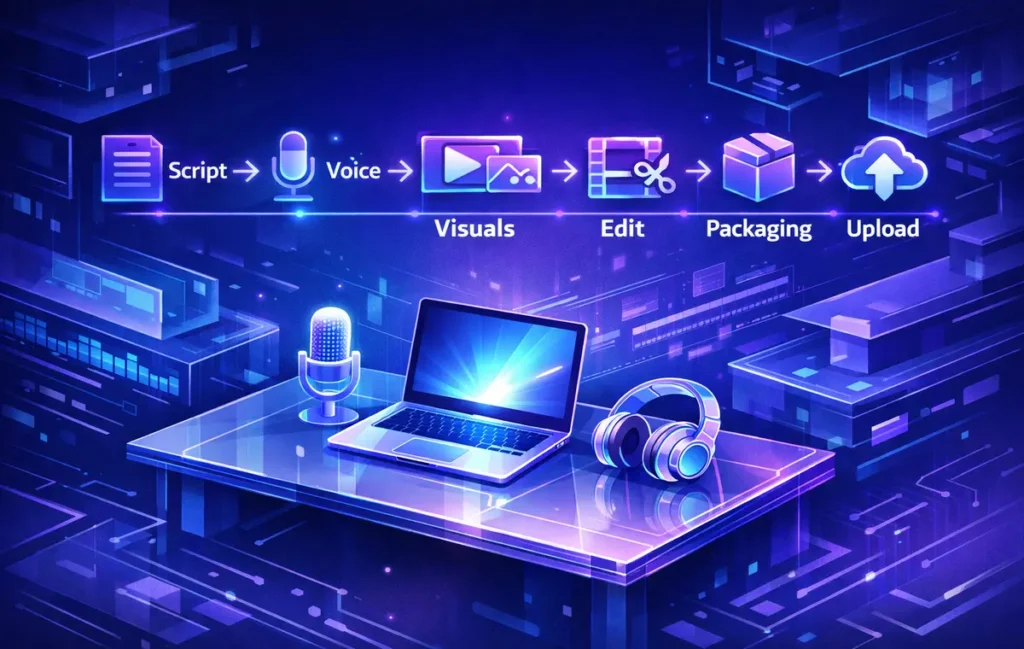
To start a faceless YouTube channel in 2026, pick a repeatable format (voiceover, screen-recording, or text-led), then build a simple “asset pipeline” you can run weekly: script → voice → visuals → edit → packaging → upload. Your growth will come less from luck and more from consistency plus retention-first editing that makes viewers forget there’s no face on screen.
💡 Nerd Tip: Your first goal isn’t “viral.” It’s “repeatable.” A channel that ships every week beats a channel that dreams every day.
🧩 Choose a Faceless Format You Can Sustain (Not Just Admire)
A faceless channel works when the format is something you can produce without negotiation. Not “when you feel inspired.” Not “once you learn a new tool.” Not “after you build a perfect template.” Sustain means: you can create the next video even on an average day.
The three faceless formats that stay sustainable in 2026 are usually:
Voiceover + B-roll / Stock Visuals: You narrate a story, tutorial, or explainer while visuals support the points. This works well for education, product breakdowns, business explainers, and list-style content—as long as you’re not just reading Wikipedia over random clips. The trick is structure and pacing, not fancy visuals.
Screen-recorded Tutorials: The “face” becomes your cursor and your clarity. This format is ridiculously effective when you can teach a workflow—especially if you already write about tools on NerdChips. You don’t need cinematic editing; you need crisp steps, a clean screen, and a strong script.
Text-led Explainers (with minimal animation): Think of it as a high-retention slideshow that doesn’t feel like a slideshow. It’s great for timelines, comparisons, “mistakes to avoid,” breakdowns, and quick learning—if you respect rhythm, captions, and pattern interrupts.
Where most faceless creators get burned: “compilation-style” content. In 2026, YouTube is increasingly sensitive to channels that feel like re-uploads, stitched clips, or low-effort remixing. If your channel’s core value is “I gathered clips,” you’re building on sand.
💡 Nerd Tip: If you can’t describe your format as a skill you’re improving (teaching, writing, narrating, editing, packaging), it’s probably not sustainable.
🧠 Niche Selection for Faceless Channels (2026 Rules That Actually Matter)
Picking a niche for a faceless channel is different from picking a niche for a personal brand. You’re not relying on personality. You’re relying on topic momentum + repeatable visuals + repeatable problems.
In 2026, a faceless niche works when it passes this three-part test:
1) Real pain, repeated often
Not “interesting.” Pain. Confusion. Cost. Risk. Time-waste. The best niches solve something people face weekly, not once in their life. That’s why “workflow tutorials,” “tool explainers,” “business systems,” and “productivity breakdowns” keep winning—they’re recurring problems.
2) Topic surface area (you need 100 video ideas without stretching)
If your niche is too narrow, you’ll burn out after 12 uploads. If it’s too broad, you’ll never build an identity. The sweet spot is a niche where you can create series: beginner → intermediate → advanced, mistakes → fixes, comparisons → setups, templates → demos.
3) Visual supply (the hidden faceless constraint)
Faceless creators forget this: you can have a great idea that is impossible to visualize without filming yourself. Before you commit, ask: can I reliably show this topic using screen recordings, diagrams, stock visuals, or product footage?
Here’s a simple “visual supply” checklist that saves months:
| Question | If “No,” what happens? | Fix |
|---|---|---|
| Can I show it with screen recordings? | You’ll rely on generic stock clips | Switch to tutorial/explainer angle |
| Can I show it with simple diagrams/text? | Retention drops (nothing changes visually) | Use pattern interrupts + structure shifts |
| Do I have 30 topics for 30 days? | You stall early and lose momentum | Build a series + sub-series |
Faceless doesn’t mean soulless. Your “personality” is your taste: what you choose to explain, what you simplify, and what you refuse to waste time on.
💡 Nerd Tip: If your niche can’t support a weekly series concept (“Every Friday: X”), it will be harder to stay consistent.
🎬 The Faceless Content Pipeline (Your Repeatable Assembly Line)
The core advantage of faceless channels is that you can treat content like a manufacturing line—without losing quality. You’re not dependent on lighting, mood, makeup, or filming energy. You’re dependent on assets.
Here’s the pipeline you’ll run every week:
Idea → Outline → Script → Voice → Visuals → Edit → Packaging → Upload
The key is not doing it “one video at a time.” The key is batching. When you batch, your brain stays in one mode longer, which reduces friction and increases consistency.
A realistic batching flow looks like this:
-
Day 1: pick 4 topics, outline all 4
-
Day 2: write scripts for all 4
-
Day 3: record all voiceovers (or generate + edit)
-
Day 4: assemble visuals + rough cuts
-
Day 5: finalize edits + titles + thumbnails + upload
You can compress it, but the logic stays: keep your brain in one gear at a time.
This is where scripting becomes your power tool. If you’ve never built scripts that hold attention, your channel will feel “informational but skippable.” NerdChips already has a strong guide on writing engaging video scripts—use it, because faceless content lives or dies by script clarity.
⚙️ Build a Faceless Production Stack That Actually Scales
Most faceless channels don’t fail because of ideas—they fail because production takes too long. A lightweight stack for scripting, voice, editing, and captions can easily save 5–8 hours per week and make consistency realistic.
💡 Nerd Tip: If you ever feel overwhelmed, don’t “work harder.” Reduce steps. A simpler pipeline executed weekly beats a complex pipeline executed twice.
✍️ Script Templates That Work Without a Face (Retention Is Written, Not Edited)
Faceless videos need scripts with visible motion. Not just visual motion—idea motion. A face naturally creates micro-variation: expressions, body language, human presence. Without a face, your script must create that momentum through structure.
A high-performing faceless script usually has three layers:
1) Hook that promises a result (not a topic)
Bad: “Today we’ll talk about faceless channels.”
Better: “By the end of this video, you’ll have a faceless channel system you can run weekly—even if you only have 60 minutes a day.”
2) A fast “map” of what’s coming
This is where you reduce anxiety. People click because they want clarity. Give them a path so they don’t bounce. (This also supports chapters later.)
3) Stimulus shifts every 7–12 seconds
Not gimmicks. Just shifts: a new example, a new visual, a quick contrast, a question, a mini recap. In faceless content, long uninterrupted explanation can bleed retention.
Here are three script “shapes” that work especially well:
-
Problem → Mistake → Fix → Proof → Steps
-
Myth → Reality → Framework → Examples → Action Plan
-
Before → After → How → Common Failures → Checklist
The “proof” doesn’t have to be external. It can be a quick demo, a before/after of a workflow, or a clear mental model. (And if you want a deeper writing system, bookmark this script engagement guide and build one reusable template for your channel.)
💡 Nerd Tip: Write like a helpful narrator, not like a textbook. If a sentence doesn’t move the viewer forward, cut it.
🎙️ Voice Strategy in 2026 (Human, AI, or Hybrid) + What’s Safe
Voice is where faceless channels either feel premium or feel cheap. And in 2026, viewers are more sensitive to voice authenticity than ever. You don’t need a “radio voice.” You need a trust voice: clear, consistent, and emotionally readable.
Option A: Human voice (best trust, best flexibility)
If you can record voiceovers, this is the simplest long-term strategy. Even a non-perfect mic can work if your room is quiet and your delivery is calm. Viewers forgive small imperfections if the content is strong.
Option B: AI voice (best speed, highest trust risk)
AI voices can scale output, but they can also make your channel feel disposable. If you use AI voice, the winning strategy is: pick one voice, tune pronunciation, add micro-pauses, and never let it sound like a lecture. The goal is “natural enough that the viewer focuses on the idea.”
Option C: Hybrid (fast + human touch)
A hybrid approach is often underrated: you draft with AI, but you record key lines yourself—especially hooks, transitions, and CTAs. Those human moments can lift perceived trust dramatically without forcing you to record everything.
Also: don’t let voice speed become your retention killer. Many faceless channels talk too fast because they’re trying to pack value. But value isn’t density—it’s comprehension. A common pattern I’ve seen: speeding up the voice raises early watch time, then causes fatigue, which drops mid-video retention.
💡 Nerd Tip: If you’re using AI voice, spend time on “pronunciation lists” for niche terms. Mispronouncing names and tools is a silent trust leak.
🖼️ Visual Strategy Without Copyright Pain (Stock, Screen, B-Roll Done Right)
This is where faceless creators get paranoid—and rightly so. Visuals aren’t just aesthetics; they’re risk management. In 2026, the safest faceless visual approach is to prioritize visuals you can own or uniquely assemble:
1) Screen recordings (highest safety, highest relevance)
If you can demonstrate anything—tool workflows, search steps, dashboards—screen recording becomes your signature. Even for “ideas” channels, you can show how you research, outline, organize, or plan.
2) Your own graphics (simple, not fancy)
You don’t need animation skills. Simple slides with clean typography, arrows, and highlighted phrases can outperform random B-roll. Why? Because they make the viewer feel guided.
3) Stock visuals (useful, but treat as seasoning)
Stock visuals are fine for transitions and atmosphere. They’re dangerous when they become the main course. If 80% of your video is generic clips, the viewer feels it—and so does the algorithm.
To keep visuals “unique” without filming yourself, use a few simple uniqueness levers:
-
Add consistent on-screen captions (not karaoke style—clean, readable)
-
Use your own structure overlays (“Step 1/7”, progress bars, quick recaps)
-
Combine stock with original ordering and meaning (don’t just “decorate”)
-
Show artifacts: checklists, templates, examples, diagrams
If you plan to create Shorts from long videos, build that into your visual strategy early. NerdChips already covers the workflow for repurposing long-form videos into short clips—and faceless channels benefit a lot from Shorts because you can test hooks and topics faster.
💡 Nerd Tip: Visuals don’t need to be expensive. They need to be intentional. Every scene should answer: “What should the viewer notice right now?”
✂️ Editing Rules for Faceless Videos (Retention-First, Not Chaos-First)
Editing for faceless content is not about adding more. It’s about removing boredom.
A retention-first faceless edit has three priorities:
1) Clarity beats style
If your captions are noisy, your transitions are constant, or your screen is cluttered, viewers get tired. A clean edit feels confident. It tells the viewer: “Relax. I’m guiding you.”
2) Pattern interrupts are scheduled, not random
A pattern interrupt can be: a zoom, a quick on-screen question, a shift to a diagram, a “mini recap,” a 3-second speed ramp, or a change in scene type. The trick is using them at natural points—after a dense explanation or before a new step.
3) Captions are a tool, not decoration
In faceless videos, captions can lift comprehension and reduce drop-off, especially on mobile. But avoid wall-of-text captions. Highlight key phrases, simplify, and keep the pace readable.
A practical benchmark that many editors use: if you go more than 8–12 seconds without a meaningful visual change, retention often starts bleeding—especially in broad niches. You can break that pattern with a new visual layer, a quick example, or a contrast.
💡 Nerd Tip: Edit like you’re protecting the viewer’s attention budget. Every extra effect spends that budget.
🟦 Eric’s Note
I’m not impressed by “content machines.” I’m impressed by creators who build a calm system they can live with—because consistency comes from peace, not pressure.
📈 SEO & Packaging in 2026 (Titles, Thumbnails, Chapters, Intent)
A faceless channel can be excellent and still invisible if packaging is weak. Packaging isn’t manipulation—it’s translation. You’re translating value into a click.
Titles (intent-first)
In 2026, you’re not competing on “best.” You’re competing on “most specific promise.” Instead of “How to Start Faceless YouTube,” try:
-
“I Built a Faceless Channel System You Can Run in 60 Minutes a Day”
-
“Faceless YouTube: The Script-to-Upload Pipeline That Actually Scales”
-
“0 to Consistent Views: My Faceless Packaging Checklist (2026)”
Thumbnails (one idea, one emotion)
Faceless thumbnails work best when they are simple: one main object, one short phrase, and a clear contrast. If your thumbnails try to explain everything, they explain nothing.
Chapters (viewer trust + skim control)
Chapters reduce anxiety. People like knowing what’s coming, especially in tutorial-style videos. A viewer who can skim is more likely to stay.
Descriptions (useful, not stuffed)
Write descriptions like a quick guide: what they’ll learn, what steps you covered, and what to do next. If you want a focused ranking framework, NerdChips has a dedicated guide on YouTube SEO and ranking that pairs perfectly with this faceless system—especially when you’re choosing keyword intent and structuring your video around it.
💡 Nerd Tip: Don’t obsess over “the best keyword.” Obsess over “the clearest intent.” Intent creates watch satisfaction, and satisfaction creates growth.
💰 Monetization Paths for Faceless Channels (Before and After YPP)
Faceless channels can monetize earlier than people think—if you stop waiting for permission.
Before YouTube Partner Program (YPP):
Affiliate: Works best when you’re teaching workflows or reviewing tools. The key is alignment: don’t promote “everything.” Promote the one tool that makes the video’s promise easier.
Lead magnet → newsletter: If you teach systems, templates, or productivity workflows, email is your long-term engine. A faceless channel paired with a newsletter becomes a flywheel: videos bring subscribers, subscribers bring views, and both bring revenue.
Digital products: Templates, Notion systems, checklists, mini-courses. Faceless creators often do well here because their value is structured, not personality-driven.
Client leads: If your channel is about editing, automation, SEO, or design, your videos become proof. You can win clients without showing your face, because your work is visible.
If you want a deeper breakdown of income strategies for small channels, NerdChips already laid it out in this monetization guide—use it to pick a model that matches your niche, not just your ego.
After YPP:
Ads become a baseline, not the goal. The highest-leverage faceless channels often treat ads as “stability money,” then build a second lane: sponsorships (when you have consistent views), affiliate stacks (when you have buyer intent), and products (when you have trust).
For faceless channels, affiliate monetization works best when the tool directly removes friction from the workflow you just taught. When viewers can shortcut scripting, voicing, or editing with the same tools you use, the click feels like help—not promotion.
💡 Nerd Tip: Monetization is easiest when it’s the natural next step of the video. If your video teaches a workflow, the offer should reduce friction in that workflow.
⚡ Want a Faster Faceless Production Pipeline?
If you’re building a faceless channel, your biggest leverage is speed without sloppiness. Tools like script assistants, AI voice options, subtitle generators, and timeline-based editors can cut hours off each upload—so you stay consistent long enough to grow.
🗓️ The 30-Day Faceless Launch Plan (Built for Consistent Growth)
A lot of people want a “plan,” but what they really need is a pace. The goal of the first 30 days isn’t to become a genius. It’s to become a finisher.
Week 1: Setup + 3 videos (your system boot-up)
Pick one format and commit. Create a simple channel identity: topic promise, visual style, and a repeatable thumbnail layout. Then publish three videos that share a common structure. Don’t over-edit. Focus on completing the pipeline. This week is about finding your friction points: where you slow down, what confuses you, what takes too long.
Week 2: 4–6 videos + packaging tests (your first optimization loop)
Now you test titles and thumbnails with intention. Keep the content solid, but start learning packaging: what gets clicked, what holds attention, where people drop off. Use chapters. Tighten intros. Remove unnecessary sections. You’re not “improving quality” in a vague way—you’re improving retention in a measurable way: shorter intros, clearer steps, stronger examples.
Week 3: Shorts repurpose + iteration (your discovery engine)
Shorts aren’t just extra content; they’re a testing lab. Clip hooks, key insights, and micro-tutorials. Watch what gets views and comments. Those are topic signals. If something hits on Shorts, it often becomes a winning long-form topic. This is where your workflow should connect with repurposing long-form into short clips so you don’t create extra work—just extra distribution.
Week 4: Double down on winners (your first “strategy” month)
This is where you stop guessing. Look at your top 1–2 videos: which topics, which structures, which thumbnails, which pacing. Create more in that lane. Don’t panic if views are low. In 30 days, you’re building signal, not stardom. The channel that wins is the channel that learns weekly.
💡 Nerd Tip: Don’t “start over” every week. The fastest growth comes from small improvements stacked on the same format.
✅ A Faceless Compliance & Quality Checklist (So You Don’t Build on Sand)
This is one of the few places where a checklist truly helps, because it reduces risk and protects consistency.
| Area | Ask yourself | If not, fix it by… |
|---|---|---|
| Reused risk | Is my value original beyond the visuals? | Adding demos, frameworks, examples, and your own structure |
| Retention | Does something change every 8–12 seconds? | Insert mini recaps, contrasts, scene shifts, or diagrams |
| Packaging | Does the title promise a result? | Rewrite around outcome + specificity + timeframe |
| Workflow | Can I publish weekly without burnout? | Batch scripts/voice/editing and reduce tool switching |
💡 Nerd Tip: Faceless channels aren’t “easier.” They’re more system-friendly. If you build the system, the channel becomes easy.
📬 Want More Creator Systems Like This?
Join our free newsletter and get weekly playbooks on creator workflows, YouTube growth, smart tools, and practical AI—built for consistency, not chaos. No fluff. Just clear systems you can actually run next week.
🔐 100% privacy. No noise. Just value-packed creator tips from NerdChips.
🧠 Nerd Verdict
A faceless YouTube channel in 2026 isn’t a loophole—it’s a discipline. The creators who win aren’t the ones who hide their face; they’re the ones who replace “personality dependence” with a stable pipeline: clear niche, repeatable format, retention-written scripts, clean visuals, and packaging that makes the value obvious. Build that system once, then let consistency do the heavy lifting.
If you want this faceless system to stay sustainable, the right tools matter less than the right combination. A simple production stack can remove most of the friction that kills consistency early.
❓ FAQ: Nerds Ask, We Answer
💬 Would You Bite?
If you had to publish one faceless video every week for the next 90 days, which format would you bet on—voiceover, screen-recording, or text-led explainers?
And what’s the one step in the pipeline you know will try to sabotage your consistency? 👇
Crafted by NerdChips for creators and teams who want their best ideas to travel the world.