🎯 What This Stack Is (and What It’s Not)
This is a production-first stack built for creators who want to publish on YouTube without being on camera—without turning their workflow into a chaotic tool buffet. The goal is simple: help you ship consistently with clean, retention-friendly videos.
This page is not a “top 50 tools” list. You’ll pick one tool per stage, keep it stable, and only optimize when your channel proves what’s working.
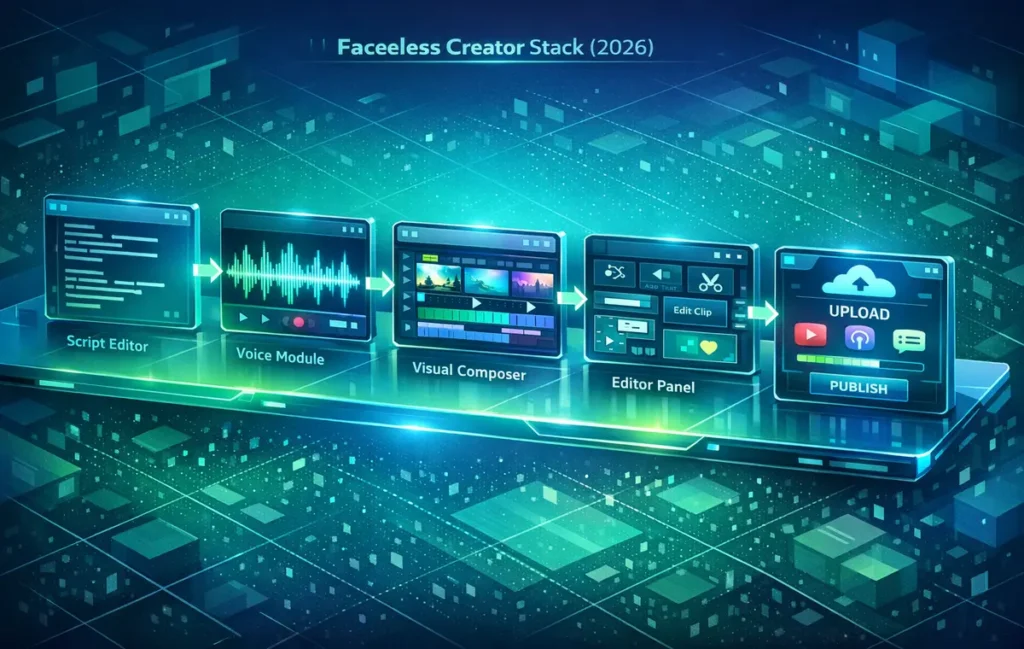
A faceless YouTube stack isn’t “more tools”—it’s fewer tools that remove friction from the same pipeline every week: script → voice → visuals → edit → captions → packaging → publish. Use this page to pick one option per stage, keep your workflow stable for 30 days, then upgrade only the step that’s slowing you down.
💡 Nerd Tip: In faceless YouTube, your biggest enemy isn’t quality—it’s friction. Tools should remove friction, not add menus.
✅ Who This Stack Is Perfect For
If any of these sound like you, you’re in the right place:
-
You want a faceless channel, but you keep getting stuck at scripting, voice, editing, or captions.
-
You want a workflow you can run in 60–120 minutes per video (once you’re warmed up).
-
You want to monetize through affiliate, lead gen, products, and later ads—without needing a personal brand.
If you’re still at the very beginning, start with the full step-by-step system here: How to Start a Faceless YouTube Channel in 2026. And if you need the general YouTube setup flow, NerdChips already has you covered: How to Start a YouTube Channel: A Step-by-Step Guide for Beginners.
🧩 The Faceless Pipeline (Pick One Tool Per Stage)
You don’t need “the best” tool. You need the tool you’ll use next week.
| Stage | Goal | Pick 1 Tool Type | What to Avoid |
|---|---|---|---|
| Script | Clear hooks + structure | Script assistant / outline tool | Generic scripts with no pacing |
| Voice | Trust + consistency | AI voice OR voice enhancer | Robotic pacing + wrong pronunciation |
| Visuals | Show, don’t decorate | Stock library OR screen recording | Reused/compilation-style footage |
| Edit | Retention-first rhythm | Timeline editor | Over-editing and visual noise |
| Captions | Comprehension + mobile watch time | Auto-caption tool | Walls of text |
| Packaging | Click clarity | Thumbnail/design tool | Busy thumbnails, vague titles |
💡 Nerd Tip: If you can’t explain why a tool exists in your pipeline in one sentence, it’s probably not a tool—it’s a distraction.
🧠 Stack Builder: Choose Your Setup Style
Pick the path that matches your reality (time, budget, patience). Then stick to it for 30 days.
🟩 Setup A: “Minimal & Fast” (Best for Busy Creators)
This setup is for creators who want speed with acceptable quality. You’re optimizing for consistency first, polish later.
-
Script tool that helps you outline + write hooks
-
Voice option that stays consistent (AI voice or enhanced human)
-
Simple stock/screen visuals
-
One editor you can learn in a weekend
-
Auto captions
-
Simple thumbnail template
💡 Nerd Tip: Your first month is “signal collection.” Don’t redesign your stack every week.
🟦 Setup B: “Clean & Premium” (Best for Long-Term Brand Channels)
This is for creators who want a more premium feel without showing their face. You’ll spend more time per video, but your output will feel more “brand” than “content.”
-
Stronger script system (templates + pacing rules)
-
Human voice or hybrid voice approach
-
More original visuals (screen recordings, simple graphics)
-
Cleaner editing style (less noise, more structure)
-
Captions as emphasis (not decoration)
-
Thumbnail system built around clarity
If you want the scripting side to carry more weight (which is the core of faceless retention), use NerdChips’ guide: How to Script Your Videos for Maximum Engagement.
✍️ Script Tools (Hook + Structure + Pacing)
Best for: faceless explainers, tutorials, “systems” channels.
What to look for: outline-to-script flow, tone control, reusable templates.
| Pick | Why it fits faceless | Link |
|---|---|---|
| ChatGPT | Helps you write hooks and keep the script moving with clear sections. | ChatGPT |
| Jasper | Useful if you batch 4–8 scripts at once and need consistency. | Jasper |
| CopyAI | Useful if you batch 4–8 scripts at once and need consistency. | CopyAI |
| Notion | Useful if you batch 4–8 scripts at once and need consistency. | Notion |
💡 Nerd Tip: A faceless script must signal progress—“here’s step one, here’s what changes next”—or retention slowly leaks.
🎙️ Voice Tools (Human, AI, or Hybrid)
Best for: creators who want consistency without camera.
What to look for: natural pacing, pronunciation control, stable voice identity.
| Pick | Best use case | Link |
|---|---|---|
| ElevenLabs | When speed matters and you can edit pacing for trust. | ElevenLabs |
| Voice Enhancer (Recommended) | When you record yourself but want cleaner sound fast. | Enhancer |
🖼️ Visual Tools (Stock, Screen, Graphics)
If you need help avoiding “generic stock video syndrome,” build your visuals around demonstrations and artifacts. Shorts repurposing helps too—here’s the NerdChips guide: How to Repurpose Long-Form Video into Short Clips.
| Pick | Why it’s safer for faceless | Link |
|---|---|---|
| OBS Studio | You “own” the visuals and the footage matches the content. | OBS Studio |
| Pexels Video | Best used as supporting b-roll, not the main value. | Pexels Video |
✂️ Editing Tools (Retention-First)
Best for: creators who want clean pacing and a repeatable template timeline.
What to look for: speed, captions workflow, easy exports, consistent presets.
| Pick | Why it fits faceless | Link |
|---|---|---|
| CapCut (Desktop) | Fast timeline editing with predictable export quality and simple templates. | CapCut |
| DaVinci Resolve |
Professional retention editing |
DaVinci Resolve |
🔤 Caption Tools (Comprehension + Watch Time)
Captions are a “silent retention lever.” They help the viewer stay oriented, especially when there’s no face.
| Pick | When it matters most | Link |
|---|---|---|
| CapCut Auto Captions | Mobile viewers, fast pacing, tutorial steps, and list-based explainers. | CapCut |
| Veed.io |
Create and edit faceless videos with auto-captions, cuts, and exports—all in one browser-based workflow. |
Veed.io |
| Subtitles.ai | Automatically generate fast, accurate subtitles to boost watch time and retention on faceless videos. | Subtitles.ai |
📦 Packaging Tools (Thumbnails + Titles That Don’t Confuse)
If you want your videos to rank and get discovered, packaging is non-negotiable. Pair this with: YouTube SEO: How to Rank Your Videos.
| Pick | What it solves | Link |
|---|---|---|
| Canva | Fast, consistent thumbnail templates without redesigning every upload. | Canva |
| TubeBuddy | Optimize faceless YouTube channels with keyword research, A/B testing, and data-driven video SEO tools. | TubeBuddy |
📬 Want the Faceless Workflow Template?
Join our free newsletter and I’ll send a simple weekly workflow template (topic → script → edit → publish) plus packaging checklists you can reuse for every upload—built for faceless creators who want consistency without burnout.
🔐 100% privacy. No noise. Just value-packed creator tips from NerdChips.
🧠 Nerd Verdict
A faceless channel becomes profitable when it becomes consistent—and consistency is mostly a workflow problem. This stack isn’t here to impress you with options. It’s here to remove friction from the same pipeline you’ll run every week, until your channel has enough momentum to reward you.
❓ FAQ: Nerds Ask, We Answer
Crafted by NerdChips for creators and teams who want their best ideas to travel the world.