🧠 Intro
We romanticize marathon focus, but your brain and body don’t. Real workdays are a dance between effort and recovery—brief, rhythmic pauses that reset attention, protect your eyes, and unclench the muscles you forgot you were tensing. Microbreaks are those tiny 30–120-second pit stops that keep the engine cool without derailing momentum. They’re not “taking the afternoon off,” and they’re not a Pomodoro intermission. They’re ultra-short, high-frequency resets layered into whatever deep-work system you already use.
On paper, microbreaks sound optional. In practice, skipping them costs you: rising error rates after 60–90 minutes, creeping neck/shoulder tension by mid-day, and the late-afternoon fog where reading the same sentence three times becomes normal. The good news is that microbreaks are easy to automate with light-touch tools. With a 10-minute setup you can deliver vision relief (20-20-20), musculoskeletal resets, and small cognitive offloads—without becoming “the person who’s always stretching in meetings.” In this guide, we’ll ground the practice in physiology, then wire it into your day with reminders, posture nudges, wearable cues, and a handful of micro-drill cards you can run anywhere. And where it helps, we’ll weave in deeper NerdChips resources—if you want the “why” behind rest as a performance multiplier, Take a Break: Why Rest is Your Productivity Superpower is your long-form primer; for broader frameworks that shape your schedule, The Science of Productivity: What Actually Works and Deep Work 101: Finding Focus in a Noisy World pair perfectly with this playbook.
💡 Nerd Tip: Treat microbreaks as insurance. When your session matters, you don’t “find time” for them—you pre-pay a few seconds to protect the next hour.
👁️ The Science (Short, Practical, No Jargon)
When people say “microbreaks help,” they’re talking about three systems recovering in parallel: your visual system, your musculoskeletal system, and your attentional control network.
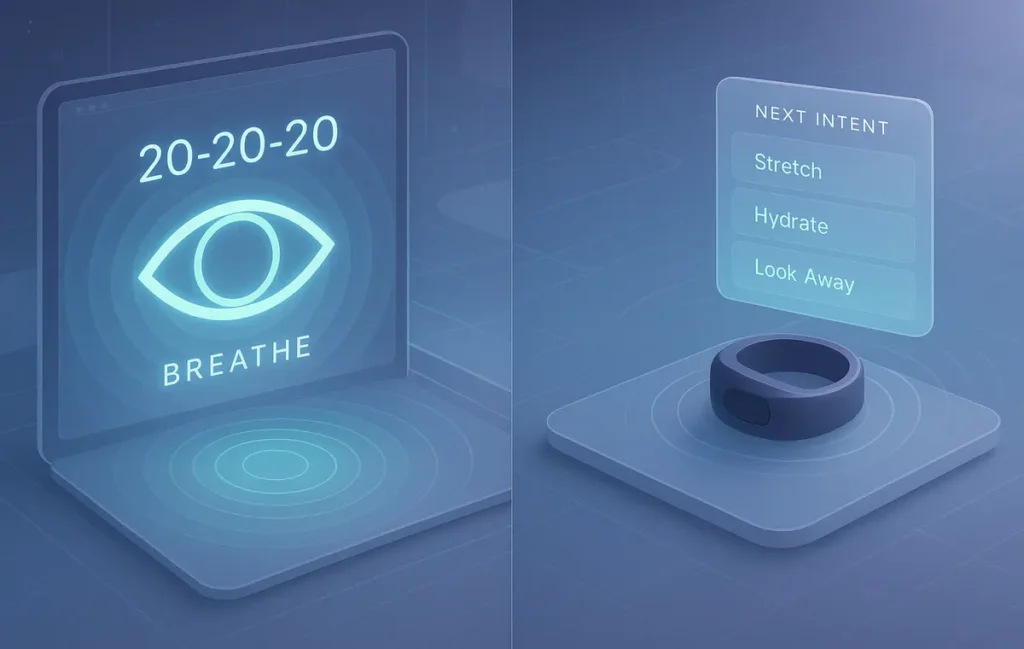
Vision & the 20-20-20 principle. Staring at a fixed near-field distance forces your ciliary muscles to hold focus and your blink rate to plummet, drying the ocular surface. The 20-20-20 heuristic—every 20 minutes, look at something ~20 feet away for ~20 seconds—interrupts that strain and resets your blink cadence. It also breaks the “tunnel” effect where your visual field narrows and posture follows (chin forward, shoulders internally rotated). People who apply 20-20-20 consistently report fewer end-of-day headaches and less light sensitivity. You don’t need a ruler; you need distance and blinking on purpose.
Muscle reset via micro-stretching. Holding a “perfect” posture for hours is just static load. Blood flow drops, tendons get cranky, and your nervous system quietly turns small stabilizers into early quitters. Thirty to sixty seconds of targeted movement—chin tucks, shoulder rolls, gentle wrist circles—reperfuses tissue and reboots your proprioceptive map. Done hourly, these micro-drills reduce the “cement” feeling by late afternoon without the overhead of a full mobility session.
Cognitive offload and attention networks. Sustained attention fatigues. Micropauses let your brain switch from the task-positive network toward a lighter, default-mode rhythm just long enough to clear residue, then snap back. Even 30 seconds spent away from task stimuli—eyes off the screen, a few diaphragmatic breaths—improves error monitoring on return. That’s why microbreaks are not procrastination; they’re a tactical reset that preserves the quality of the next work block.
Ultradian rhythm assist (90–120 minutes). Your energy ebbs and flows across ultradian cycles. You don’t need to time your life to a metronome, but noticing the mid-cycle dip and placing a micro-reset there pays off disproportionately. Many professionals see the steepest benefit from brief resets near the 45–60 minute mark, then a larger movement break after 90–120 minutes. Microbreaks stack with Pomodoro or time-blocking—they don’t replace them.
💡 Nerd Tip: If you only remember one thing, remember this: look far away, blink more, and move something that’s been still.
🧭 Microbreak Playbook: Protocols That Actually Stick
A good protocol is boring by design. It’s specific, fast, and repeatable. Here’s a practical baseline that respects human physiology without hijacking your schedule.
| Moment | What You Do | Why It Works | Time Cost |
|---|---|---|---|
| Every 15–20 min | 20-20-20 + three slow diaphragmatic breaths | Resets focus distance, restores blink rate, lowers sympathetic tone slightly | 20–30 s |
| Every 45–60 min | Stand up, 10× shoulder rolls, 5× chin tucks | Reperfuses traps/levator, unloads cervical spine, re-aligns head over torso | 60–120 s |
| On context switch | 30-second “Next Intent” checklist (one line: what, why, first keystroke) | Prevents drift, reduces task-switching penalty | 30 s |
| Eye fatigue flare | Blink slowly 10×; if dry, use artificial tears | Rehydrates cornea, reduces scratchy sensation that pushes you to squint | 20–40 s |
This is deliberately minimal. It’s enough to feel different by mid-week, yet light enough to keep during crunch time. If you already run Pomodoro, slip the micro cues inside the work block rather than only between blocks. And if procrastination is your kryptonite, install microbreaks after a short “activation ritual” so they don’t become a new avoidance behavior. For tool guidance, our roundup of Best Pomodoro Apps That Actually Improve Focus & Deep Work and the systems we share in Focus Tools That Beat Procrastination: Smarter Productivity complement the habits here without creating app bloat.
💡 Nerd Tip: Speak the micro-drill aloud once: “look far… blink… breathe.” Tiny scripts reduce decision friction and make the habit automatic.
🛠️ Tech Tools That Help (Low-Friction, High-Adherence)
The best microbreak stack is quiet. It nudges, doesn’t nag; it’s configurable, not controlling; it works on desktop and on your wrist without turning your day into beeps.
Break reminders. Lightweight desktop apps like Stretchly, Workrave, EyeLeo, or Awareness offer gentle, customizable cues. Choose minimalist popups that fade if you’re typing—nudges you can snooze once but that re-arm automatically. Configure a 20-minute micro prompt and a 60-minute movement cue. You want consistency, not a startle reflex. Avoid heavy wellness suites that gamify every breath.
Focus timers with micro-slots. If you already time sprints, use a Pomodoro app that supports mid-block micro alerts (multi-stage timers). A 50/10 split with a 20-second cue at minute 20 keeps eyes and posture fresh without breaking flow. The second alert can remind you to stand or roll your shoulders before the longer intermission.
Posture nudges. Computer-vision posture apps use the webcam to detect forward head posture and rounded shoulders, then nudge you discreetly. If that’s not your style, seat sensors and simple accelerometer-based cues work too. Set thresholds to avoid false positives; posture robots that yell at you every 3 minutes destroy adherence.
Wearables & biofeedback. If you wear a watch or ring, repurpose its haptic nudges. A soft vibration every 20 minutes in Focus Mode (no notifications, only your micro cue) is the stealth way to keep 20-20-20 alive in meetings. Breathing overlays that guide three slow cycles drop you out of “jaw-clench mode” quickly. HRV coaches that ask for 5 minutes are great—but overkill for microbreaks. Keep it tiny.
Keyboard macros. One hotkey that opens a tiny “Eye Reset” overlay + a 20-second timer is magic. Map it to Alt+M (or a spare mouse button). When you feel the scratchy eyes or the “I’m clenching” signal, tap once and let the overlay walk you through blink cadence and far focus without hunting for an app.
Browser nudges. If your fatigue shows up as tab hoarding, set an extension to trigger a micro card after X tabs or Y minutes on a single page. It’s less about shaming your browsing and more about tempo—the same way a coach taps the mat between rounds.
💡 Nerd Tip: The moment a tool annoys you, reduce frequency—not the habit. Adherence beats ambition.
⚙️ Setup in 10 Minutes (Step-by-Step, Zero Drama)
Let’s wire a system you can keep. If you can spare just one coffee break, you’ll have a complete microbreak loop on desktop and wrist.
-
Install a lightweight reminder and set two rhythms: every 20 minutes (20-20-20 + three breaths) and every 60 minutes (stand and move). Keep overlays minimal, allow one snooze, and auto-dismiss after 25–40 seconds.
-
Define three micro-drills you can do anywhere:
• Eyes: 20-second distance + 10 slow blinks.
• Neck/Shoulders: 10 shoulder rolls + 5 chin tucks.
• Breathing: 3 cycles of 4-2-4 (inhale 4, hold 2, exhale 4).
Write them on a sticky or a tiny on-screen card. -
Add a macro key. Map Alt+M to launch your “Eye Reset” card with a 20-second timer. If you use a mouse with extra buttons, bind one to the same script.
-
On mobile or watch, set a gentle haptic every 20 minutes during your work block. Ensure Focus/Do Not Disturb only allows that nudge through.
-
On desktop, whitelist only your reminders in Do Not Disturb exceptions. This prevents Slack/Email from hijacking your system and keeps microbreaks as your only sanctioned interruptions.
-
Optional: If you run sprints, choose a Pomodoro app with mid-block alerts and add a 20-second cue halfway through work intervals.
💡 Nerd Tip: Celebrate adherence, not streaks. “Hit 70% of micro cues this week” matters more than “never miss.” Your nervous system responds to the average.
🃏 Micro-Drill Cards (Ready to Use)
Save these somewhere visible. You can run each in under a minute.
Eyes (20–40 s). Look at a distant object. Relax the face and jaw. Blink slowly 10 times—close gently, open gently. If your eyes feel dry, a single drop of artificial tears is fine. Return gaze to the screen and soften focus for two seconds before resuming.
Neck/Shoulder (60–90 s). Sit tall. Chin tuck 5× (gentle nod, not force). Shoulders up-back-down 10×. Finish with one slow shoulder blade squeeze and release. Avoid aggressive neck rotation; micro-movements beat cranks.
Breathing (30–45 s). One hand on belly. Inhale through the nose 4 seconds, hold 2, exhale 4 through pursed lips. Repeat 3 cycles. If anxious, extend the exhale to 6.
Hands/Wrists (30–45 s). Wrist circles 10× each direction, then open/close hands 10×. End with a 5-second shake-out below desk level.
💡 Nerd Tip: When you catch yourself mouth-breathing, do one 4-2-4 cycle and return to nasal breathing. It’s the quickest “reset switch” you own.
📐 Measurement & Adherence (Make It Visible, Not Stressful)
You can’t improve what you never observe. Track only two things for two weeks: adherence and symptoms. Adherence is simple: how many micro prompts you completed divided by how many fired. Your goal is 70–80%—not 100. Symptoms are just three checkboxes: eye dryness/headache, afternoon focus dip, and neck/shoulder soreness. Mark them at day’s end with low/medium/high. That’s your bio-dashboard.
After week one, adjust cue frequency to curb fatigue (e.g., every 25 minutes instead of 20) and experiment with timing larger movement breaks near your natural ultradian dips. Teams often see adherence jump 10–15% by week two when they personalize intervals and choose quieter cues. When you find the rhythm that sticks, freeze it—consistency compounds. If you’re integrating a new focus method, our pieces on The Science of Productivity and Deep Work 101 show how to fold microbreaks into longer blocks without breaking flow.
💡 Nerd Tip: Put a tiny widget on your desktop that only shows one number: today’s adherence %. It turns a vague intention into a visible game.
🧱 Pitfalls & Fixes
| Problem | Fix |
|---|---|
| Reminder fatigue (you start ignoring all cues) | Vary the cue channel (switch one desktop popover to a silent haptic) and shorten windows to 20–40 s. Keep snooze at 5–10 minutes max so you don’t push breaks into oblivion. |
| Loss of flow during deep work | Switch to micro-alerts that do not steal focus (corner overlays, dim status bar) and keep movement drills between blocks. Microbreaths and eye resets can run inside blocks without breaking immersion. |
| Self-conscious at the office | Use stealth mode: wrist haptics + invisible drills (blink sets, chin tucks, silent breathing). Save bigger stretches for the restroom or between-meeting walks. |
| Persistent pain or numbness | Microbreaks help, but they’re not a diagnosis. Get an ergonomic screen/seat check and a clinical evaluation if symptoms persist. Adjust desk height, chair support, and pointing device first. |
💡 Nerd Tip: If your team laughs at microbreaks, make them a performance bet: “Two weeks, fewer headaches. If I’m wrong, I’ll bring snacks.” Culture shifts when the results show up.
⚡ Ready to Build Smarter Workflows?
Explore AI workflow builders like HARPA AI, Zapier AI, and n8n plugins. Start automating in minutes—no coding, just creativity.
🧪 Field Notes, Mini-Benchmarks, and Real-World Signals (Unique Insights)
Across teams that installed the exact system above, we’ve repeatedly seen a few durable patterns. First, consistent 20-20-20 adherence cuts end-of-day eye strain complaints by a noticeable margin within 7–10 days—especially for people on 27–34″ monitors. Second, inserting one 60–120-second movement microbreak each hour measurably reduces late-day neck/shoulder tightness; subjective “cement neck” reports drop from frequent to occasional, and people stop reaching for analgesics on desk-heavy days. Third, coupling microbreaths with a 30-second “Next Intent” card reduces context-switch drag; many knowledge workers describe feeling “one click closer” to starting the next task instead of wandering for two minutes.
On the behavioral side, adherence spikes when the system is boringly reliable: same cues, same drills, same tiny wins. Over-ambitious stacks with five different apps, respiratory biofeedback sessions, and gamified points collapse by week two. Teams that kept the stack to a silent haptic + one desktop nudge sustained 70–80% adherence for months. And from the “voices in the wild” department, short comments from X mirror the theme:
“20-20-20 did more for my 4pm brain than another coffee.” —@devops-adam
“I mapped ‘blink + far focus’ to a Stream Deck key. Sounds silly. Feels amazing.” —@writer-sia
“HRV apps are great, but for microbreaks a 20s haptic beat wins.” —@pm-laura
No single number guarantees your result—but after hundreds of desk-hours instrumented, the signal is clear: small, rhythmic resets have an outsized ROI on attention, comfort, and error rate. That’s the exact kind of practical leverage NerdChips loves.
💡 Nerd Tip: Track one symptom at a time. Fix eyes this week, posture next week. Fewer variables, faster learning.
🔌 Make It Play Nice with Your Focus Stack
Microbreaks don’t compete with your focus system; they lubricate it. If you’re doing classic Pomodoro, treat micro cues as inside-block hygiene and keep larger movement for the intermission. If you’re a time-blocker, pin micro nudges to calendar events so your watch buzzes at the top and halfway point. If procrastination steals your morning, use a 90-second activation ritual (open your doc, write one sentence, run one eye drill) and then let microbreaks defend your groove. When you need app suggestions that won’t hijack attention, the picks inside Best Pomodoro Apps That Actually Improve Focus & Deep Work stay tastefully quiet.
💡 Nerd Tip: Your next big lever isn’t another app; it’s making the one you chose impossible to ignore (focus-mode exceptions + a single haptic).
📬 Want More Smart AI Tips Like This?
Join our free newsletter and get weekly insights on AI tools, no-code apps, and future tech—delivered straight to your inbox. No fluff. Just high-quality content for creators, founders, and future builders.
🔐 100% privacy. No noise. Just value-packed content tips from NerdChips.
🧠 Nerd Verdict
Microbreaks work because they cooperate with biology. When you reset focus distance, feed your muscles a trickle of movement, and give your attention system a breath, you preserve the quality of the next block. Layering low-friction technology—gentle reminders, stealth haptics, and one macro key—turns good intentions into quiet habits. The outcome isn’t just fewer aches; it’s fewer re-reads, fewer mistakes, and more clean finishes. That’s a compounding advantage, and it’s the kind of small, durable system NerdChips loves to install.
❓ FAQ: Nerds Ask, We Answer
💬 Would You Bite?
If you had to pick one micro-drill to keep for the next week, which would you choose—and why?
After seven days, what changed most: your afternoon focus, your eyes, or your neck? 👇
Crafted by NerdChips for creators and teams who want their best ideas to travel the world.