The habit apps that finally work in 2026 don’t just “ping you at 8 PM.” They use smart, behavior-aware reminders that adapt to your energy, context, and past behavior—nudging you when you’re actually likely to follow through, not when you’re already busy, exhausted, or mentally offline.
🌧️ Why Most Habit Apps Fail (And How Smart Reminders Fix It)
If you’ve ever installed a habit tracker, felt motivated for three days, and then watched it turn into a graveyard of red Xs and ignored notifications, you’re not alone. Most apps still treat “reminders” as simple alarms you set once and then forget to adjust. They fire at the wrong time, in the wrong context, and slowly become background noise.
The problem isn’t that you lack discipline. The problem is that static reminders don’t respect how human attention actually works. You don’t need another generic buzz at 8 PM telling you to meditate while you’re literally on a call, commuting, or doomscrolling. You need a trigger that meets you at a realistic moment in your real day.
Smart reminder systems turn that around. Instead of repeating the same notification forever, they adjust based on your behavior: when you usually complete the habit, when you consistently ignore it, how your weekdays differ from weekends, even how your energy patterns shift across the day. Think of it as “habit system engineering,” not just “app selection.”
If you’ve already read guides like Habit-Tracking Apps to Build Better Routines, you know the basics of picking a decent tracker. This NerdChips guide zooms into a narrower, more powerful question: which apps and systems actually use smart reminders to make habits stick—and how can you build the same logic into your own setup?
💡 Nerd Tip: Don’t judge a habit app by how pretty its streaks look. Judge it by how well it chooses the exact moment it asks you to act.
🔥 What Makes a Reminder “Smart” in 2026?
“Smart reminder” has become a marketing phrase, but under the buzz there are real, concrete capabilities. To understand which apps actually help you, it’s useful to break them into a few dimensions: behavioral triggers, predictive timing, energy-aware schedules, and contextual sensing.
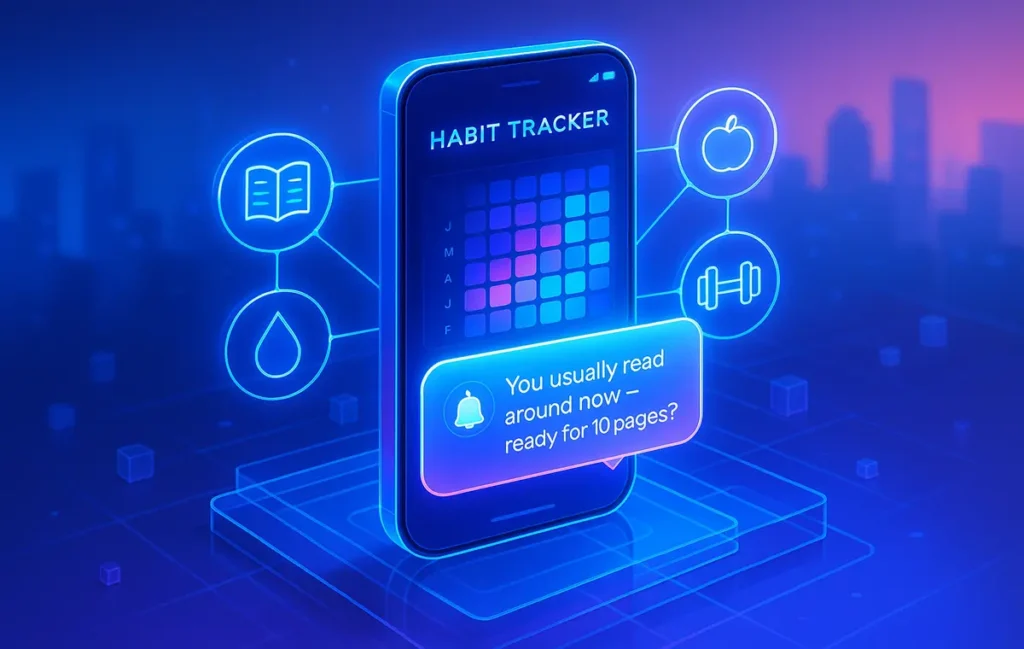
Behavioral triggers mean the app doesn’t just rely on a fixed time. It looks at your past behavior—when you tend to complete or skip a habit—and nudges you around those windows. If you consistently check off “reading” between 21:00–22:00, it will learn to remind you closer to that period, instead of nagging at 18:00 when you’re still deep in work mode.
Predictive timing goes a step further. Some apps recognize patterns like “you’ve skipped three evenings in a row” and shift the reminder earlier, or suggest a smaller version of the habit: instead of “30 minutes workout,” it nudges “5 minutes stretching now?” The intelligence comes from noticing that your aspirational schedule isn’t matching reality, and offering a more realistic entry point.
Energy-aware schedules use chronotype or sleep patterns to schedule habits for when you’re naturally more alert. If you’ve experimented with a Chronotype-Aware Weekly Plan in Notion, you already understand this: morning larks and night owls shouldn’t get identical reminder schedules. The smarter habit apps pull this logic directly into notification timing.
Finally, contextual sensing means the app pays attention to things like location, device usage, or even whether you’re already in a deep-focus session. A reminder to “go for a walk” right in the middle of a carefully protected deep work block is not helpful. A reminder that appears exactly as you close a long work session is.
💡 Nerd Tip: Any time you configure reminders, ask: “What is the app learning from my behavior?” If the answer is “nothing,” the reminders aren’t actually smart, they’re just polite alarms.
⚡ Why Smart Reminders Improve Habit Completion Rates
The core reason smart reminders work better is simple: they aim at your brain’s real state, not your calendar’s fantasy. Behind that, there are a few deeper psychological mechanisms worth understanding.
First, there’s attention fatigue. Static reminders compete with every other notification vying for your focus. After the novelty wears off, your brain learns to treat them as low-priority noise. Smart reminders counter this by appearing less often, at more relevant moments. Fewer, better-timed nudges get noticed more than constant interruptions.
Second, smart reminders support micro-commitments. Instead of asking you to perform the full “ideal” version of a habit every time, they can suggest smaller, more realistic actions based on your recent performance. If you’re on a rough week, the reminder might say, “Just 5 minutes of journaling to keep your streak alive,” rather than guilting you about a missed 30-minute session.
Third, context alignment matters. When reminders align with your energy and environment—like hitting you with a “focus block now?” nudge right as you naturally start working—they feel supportive, not adversarial. This is where deep work systems come in: pairing smart reminders with techniques from Deep Work Techniques for Remote Workers: Focus Deeply creates a rhythm where cues and environment reinforce each other.
It’s common to see habit completion rates jump significantly once reminders move from static to adaptive. You won’t see a precise “3x” for everyone, but the pattern is the same: once the app stops shouting at the wrong times and starts whispering at the right ones, your habits finally have a chance to become automatic.
💡 Nerd Tip: Track not just “did I do it?” but also “did the reminder show up at a good time?” Your subjective sense of timing is a powerful feedback signal for tuning your system.
📱 The Best Habit Tracker Apps with Actual Smart Reminder Systems
Plenty of habit apps claim to have “smart” notifications, but in practice many still give you slightly fancier versions of fixed alarms. In 2026, the apps that stand out share a few characteristics: they learn from your behavior, surface patterns you can act on, and let you fine-tune how aggressive or gentle the nudges should be.
Some lean minimalist, pairing clean interfaces with subtle, behavior-aware reminders. They focus on streaks, a few key habits, and clear calendar-style overviews. If you’re drawn to that aesthetic, you’ll probably resonate with the kind of apps covered in Minimal Habit Trackers with Calendar Heatmaps, where heatmaps show at a glance when your system is working and when it’s slipping.
Others integrate habit tracking as part of a broader productivity system. For example, some to-do and calendar apps now include habit modules that use your existing schedule to time reminders. If your calendar already shows a time-blocked deep work session, the app can propose placing your “write for 30 minutes” habit there instead of inventing a separate random slot.
A few newer tools integrate AI more explicitly. They analyze your checked and skipped habits, your average completion time, and even your late-night screen usage to adjust reminders. If you always swipe away “workout” at 22:00, they’ll gradually stop trying to convince you that you’re a late-night athlete and propose a morning micro-session instead.
The details vary, but the hallmark is the same: they treat the reminder system as a living thing that evolves with you. When you evaluate habit apps now, it’s worth asking not “how many features does this have?” but “how does this app adapt the way it asks me to act?”
💡 Nerd Tip: Spend one week paying attention to how an app’s reminders change—if at all—after a string of misses. If nothing changes, the app isn’t truly invested in you succeeding.
🧠 How AI Improves Habit Tracking (And When It Doesn’t)
AI is now sitting under the hood of many habit and productivity apps, but it’s not always clear where it genuinely helps versus where it’s just buzzword dressing. The most helpful uses are surprisingly simple: prediction, suggestion, and pattern detection anchored in your actual data.
Prediction means estimating when you’re most likely to complete a habit based on your history. If your tracker notices you almost never hit “study” at 6 AM but frequently succeed at 19:30, it can slowly shift reminders or propose that you officially move the habit to the evening. Instead of fighting your default, it aligns with it.
Suggestion comes in when AI proposes micro-habits or fallback options. Maybe you keep failing at “read 30 pages,” but you often have 10 spare minutes between calls. A well-designed system might suggest reframing the habit to “read 5 pages,” or splitting it into smaller sessions. In other words, the AI nudges you away from perfectionism and towards consistency.
Pattern detection surfaces things you wouldn’t notice on your own. Over a few months, an AI-powered habit tracker might point out that your completion rates are dramatically better on days when you also had a dedicated focus block. That’s your cue to combine tools, perhaps leveraging a time-blocking setup similar to the ones in Best Time-Blocking Apps That Actually Improve Focus & Deep Work so your habits and deep work become part of the same rhythm.
Where AI doesn’t help is when it’s trained on your aspirations instead of your reality. If you overconfigure your ideal routine and then never live it, the model will try to learn from a fantasy and serve you reminders that don’t match your actual behavior. Another failure mode is overconfident predictions: “We think you’ll love a 5 AM run!” when the last three months clearly say otherwise.
💡 Nerd Tip: Feed your system honest data. If you skipped a habit, mark it as skipped instead of pretending you did it. AI can only become genuinely helpful if it sees what’s really happening.
⚡ Ready to Upgrade Your Habit System?
Pair a smart habit tracker with behavior-based reminders and a realistic daily plan. Start with one core habit, tune the timing for your real life, and let the system carry the weight of remembering.
🧩 Build Your Own Smart Reminder System (Without Coding)
You don’t have to wait for the “perfect” app to ship every feature you want. With the tools available in 2026, you can build a surprisingly smart reminder system using a combination of your existing apps, system automations, and a little bit of logic.
Start by choosing a primary habit hub—this could be your favorite habit tracker, a Notion dashboard, or a simple to-do app. The key requirement is that you can log completions consistently. From there, connect that hub to automations like iOS Shortcuts, Android routines, or no-code platforms. The goal is to trigger reminders based on events, not just clock times.
For example, you might create a trigger that fires when your workday “ends” in your calendar, launching a subtle prompt: “You usually do your walk now. Up for 10 minutes?” Or a rule that sends a nudge when your screen time exceeds a threshold: “You’ve been scrolling for 90 minutes. Want to swap 5 of those for reading instead?” Over time, these condition-based nudges feel much more aligned than fixed alarm-style reminders.
If you already live in structured planning systems, integrating smart reminders with your weekly layout is powerful. A chronotype-aware setup, like the one discussed in Chronotype-Aware Weekly Plan in Notion, can give you a blueprint for when your brain naturally prefers deep work, admin, or rest. Your automations simply piggyback on that.
💡 Nerd Tip: Think in “if this, then gentle nudge”—not “if this, then scream.” Smart reminders are cues, not command-and-control systems.
📅 A Real Daily Workflow: Smart Reminders in Action
To make this concrete, let’s walk through a day built around smart habit reminders instead of dumb alarms. Imagine a remote worker who wants to maintain three core habits: morning movement, a daily deep work block, and an evening shutdown routine.
The day starts with a calm, chronotype-aware morning. Instead of a 6 AM “workout” alarm blaring every day, the system notices that most successful movement sessions happen between 7:30 and 8:00. On days when sleep was shorter, it quietly delays the nudge by 20–30 minutes. The reminder that actually appears on-screen says something like: “You usually feel better after 10 minutes of stretching now—want to keep the streak alive?”
Late morning, the worker enters a focus block. The system doesn’t fire any habit reminders here; in fact, part of your deep work infrastructure should explicitly silence everything else. This is where combining habit systems with the practices in Deep Work Techniques for Remote Workers: Focus Deeply pays off: your reminders are aware of the sacredness of those blocks.
Mid-afternoon, a small slump hits. Historically, this person tends to procrastinate or drift into low-value tasks. The habit system, seeing the pattern, proposes a tiny reset habit: “3-minute reset: stand up, breathe, note your next meaningful task?” Because this bounce-back habit has been configured as “low friction, high benefit,” completion rates are high.
In the evening, instead of a guilt-inducing “no screens after 10!” ping, the system watches for work apps closing and devices going idle. It then prompts a shutdown sequence: “Do you want to log today’s wins and set 3 priorities for tomorrow?” That small ritual is tracked as a habit and reinforces the sense of closure.
On the weekend, reminders shift tone. Instead of pushing productivity, the system emphasizes restorative habits—walks, reading, calls with friends—recognizing that sustainable habits live inside sustainable weeks.
💡 Nerd Tip: Design your reminders as part of a story your day is telling: ramp up, focus, reset, wind down. Habits make more sense when they’re anchored in a narrative, not scattered randomly.
💥 Common Mistakes That Kill Habits (And How Smart Reminders Fix Them)
Even the best app can’t save a fundamentally broken approach. The same patterns show up again and again when people complain that “habit tracking doesn’t work for me”—and smart reminders can quietly counter each of them.
The first mistake is simply having too many reminders. When every micro-habit gets its own ping, the signal-to-noise ratio collapses. Your brain categorizes them as spam, even if the intentions were pure. Smart systems help by letting you bundle habits into clusters: one “morning activation” reminder that covers stretching, hydration, and planning; one “evening shutdown” cue instead of five separate nags.
The second mistake is wrong timing. People often choose reminder times that match their ideal self, not their real life. You pick 5 AM gym because it sounds admirable, then berate yourself when you swipe it away. Smart reminders, especially those tuned for energy and chronotype, help by gradually aligning to the times you actually follow through. They guide you back toward realistic habit windows without judgment.
The third mistake is zero feedback. If your system only shows red or green dots, you never learn why habits are failing. Advanced trackers surface insights like “completion drops sharply on days without a focus block” or “you rarely do this habit after 21:30.” Combining these insights with structures from Best Time-Blocking Apps That Actually Improve Focus & Deep Work lets you redesign not just reminders, but your entire day.
Finally, many people ignore trigger stacking—linking habits to existing routines. Smart reminders can prompt you at anchor points such as “after you finish lunch” or “when you close your laptop for the day,” rather than arbitrary times. This shifts habits from “another thing on your list” to “the natural next step” in your existing rhythm.
💡 Nerd Tip: If a habit keeps failing, change the context, not just the app. Smart reminders work best when they’re reinforcing a realistic behavior pattern, not fighting an impossible one.
💬 Eric’s Note
I’ve tested more habit apps than I can count, but the ones that stuck were always the ones that respected my focus instead of interrupting it. If a “smart” reminder system makes you feel hunted rather than supported, it’s not actually smart yet.
📬 Want More NerdChips Habit & Systems Playbooks?
Join our free newsletter and get weekly breakdowns on habit apps, deep work systems, and future-proof productivity tools—so your routines are driven by design, not guilt.
🔐 100% privacy. No noise. Just value-packed systems thinking from NerdChips, for people who actually care about their time.
🧠 Nerd Verdict: Smart Reminders as the Missing Layer
Most people think they have a “motivation problem” when they really have a trigger problem. They intend to read, move, meditate or write—but the reminder shows up at the wrong time, in the wrong tone, with zero respect for their actual life. Of course the habit dies.
Smart reminder systems add the missing layer between your goals and your reality. They watch when you actually act, not when you wish you would. They adapt to your energy, stack on top of existing routines, and gracefully back off when you’re in deep focus. Instead of yelling louder, they learn to whisper better.
For the NerdChips tribe, this is where habit apps finally become interesting. It’s not about collecting more streaks or prettier heatmaps. It’s about building a subtle, data-informed layer that helps your best intentions survive contact with Monday morning. In that sense, smart reminders aren’t just a feature—they’re an operating system upgrade for how you show up to your own life.
❓ FAQ: Nerds Ask, We Answer
💬 Would You Bite?
If you could give just one habit in your life a truly smart reminder system—timed to your energy, context and focus—what would it be?
And what’s the biggest thing your current apps still get wrong about when and how to nudge you? 👇
Crafted by NerdChips for creators and teams who want their best ideas to travel the world.