🧠 The Problem — Meetings Without Prep Are Just “Live Email”
If you’ve ever left a 60-minute call thinking, “That could’ve been an email,” you’ve already felt the cost of meetings without preparation. When nobody has done the thinking upfront, the meeting becomes a live writing session: people rehash background, discover constraints in real time, and attempt to brainstorm and decide while everyone is half-distracted by notifications. The call turns into a very expensive inbox thread with faces.
The financial cost is not trivial. A one-hour meeting with six people is six hours of focused time. For a small team, that might be an entire workday’s worth of deep work, spent mostly on context-setting that could have been shared asynchronously. Multiply that across a week and you end up with dozens of hours where highly skilled people are listening to information they could have read in three minutes.
There’s also the cognitive cost. Constant context switching, decision fatigue, and unclear ownership after meetings quietly erode performance. When meetings don’t have a crisp purpose or clear artefacts, decisions are revisited repeatedly. Someone remembers a detail differently, or a stakeholder who missed the call asks for a “quick recap” that becomes another 30-minute slot. This is how teams end up in the “meeting treadmill” described in pieces like Meetings that Don’t Suck: Productivity in Group Discussions—lots of motion, not much momentum.
Remote and hybrid teams feel this even more. Without hallway updates, leaders often default to “just jump on a call” for every concern. The result: calendars packed with status meetings that could have been async updates, and “strategy discussions” that are really just everyone discovering the problem together. That’s why many of the best Pro Tips for Better Virtual Meetings start with prep, not with software settings.
💡 Nerd Tip: Before accepting any recurring meeting, ask yourself, “If I read a clear, well-written brief 24 hours before this call, would I still need an hour?” If the answer is “not really,” you’ve just found a candidate for the Three-Document Rule.
🏛️ The Three-Document Rule (Overview)
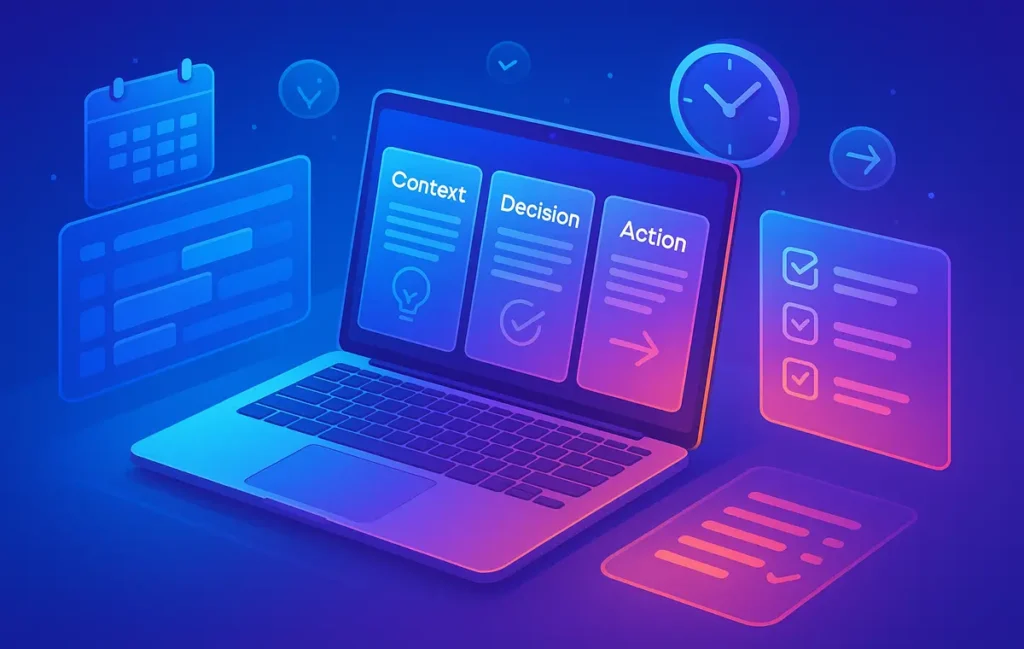
The Three-Document Rule is simple: no meeting goes on the calendar unless three lightweight documents exist before the call:
-
Context Doc – Why does this meeting exist? What is the problem, and what are the stakes and constraints?
-
Decision Doc – What decisions need to be made? What are the options and tradeoffs on the table?
-
Action Doc – How will outcomes be captured in a standard format: owners, deadlines, metrics, and follow-ups?
Think of this as meeting hygiene, not bureaucracy. The goal is not to produce long decks; it’s to force clarity. If you can’t write one paragraph explaining the problem, one section listing the decision options, and one template to capture actions, you probably don’t need a meeting. You need more thinking, or you need async collaboration.
In practice, this rule creates a powerful filter. Meetings that don’t deserve to exist quietly disappear because nobody is willing to do even five minutes of prep. Other meetings shrink in length because attendees arrive already oriented, having read the Context and skimmed the options. The call becomes a short, focused negotiation instead of a wandering conversation.
This rule also plays extremely well with the virtual meeting habits you might already be developing. If you’ve implemented techniques from Pro Tips for Better Virtual Meetings or Zoom Like a Pro: Better Virtual Meetings in 5 Steps, the Three-Document Rule is the missing upstream piece: it ensures those well-run calls are actually worth having.
Eric’s Note: There’s no heroism in “winging it” because you’re busy. The leaders people trust most are usually the ones who prepare quietly, then make the call feel effortless.
💡 Nerd Tip: Treat the Three-Document Rule as an “on/off” switch, not a suggestion. Either the documents exist, or the meeting doesn’t happen.
📄 Document #1 – Context Doc (Problem + Stakes + Constraints)
The Context Doc is where you do the work that used to happen in the first 15–20 minutes of a messy meeting. Its job is to answer three questions before anyone joins a call: What is the problem? Why does it matter now? What constraints shape our choices?
A good Context Doc starts with a short problem statement. One or two paragraphs are enough: articulate what’s not working and how it shows up. Instead of “Paid ads are bad,” write something like, “Our paid search CPA has risen 38% in the last six weeks while lead quality has stayed flat, putting Q2 pipeline at risk.” That level of concreteness helps participants arrive with real mental models rather than vague frustration.
Next, provide background on what’s already been tried. Have you paused campaigns, changed audiences, tweaked landing pages? This is where links to dashboards, tickets, or earlier briefs live. The goal isn’t to dump every data point; it’s to spare people from asking, “Wait, did we already test that?” The more remote your team is, the more this written backbone replaces hallway context—very much aligned with what you’d see in strong async cultures described in posts like 10 Pro Tips for Mastering Remote Work.
Finally, spell out constraints. Budget ceilings, deadlines, headcount limits, compliance rules—all the things that silently shape what “good” solutions look like. When constraints are known at the start, people stop suggesting options that will be rejected later for invisible reasons, which is a huge accelerator.
Here’s a concrete example of a Context Doc title:
“Paid Ads CPA Too High – Q2 Fix Discussion”
Problem: CPA up 38% in six weeks, pipeline risk.
Background: List of previous experiments with very short notes.
Constraints: Budget cap, geography, and any commitments to partners.
💡 Nerd Tip: If you can’t summarise the problem and constraints on a single screen, you’re not clarifying—you’re offloading. Trim ruthlessly until someone new to the topic could understand the stakes in five minutes.
🧭 Document #2 – Decision Doc (Questions, Options, Tradeoffs)
If the Context Doc frames the “why now,” the Decision Doc frames the “what exactly are we choosing between?” Most meetings break down here: people share opinions without a shared model of the decision itself. The Decision Doc forces you to articulate a master question and a small set of real options.
Start with that master question, stated as clearly as possible. Examples: “Which Q3 content themes should we prioritise to support product launch X?” or “Do we reduce meeting load by cutting, merging, or shortening weekly check-ins?” A good rule of thumb: if your question can’t fit in one sentence, you haven’t finished thinking.
Then outline 2–4 options. More options usually just means you haven’t grouped them well enough. For each, briefly describe what it entails and list the main upsides and downsides. This is where you can use a tiny bit of structure—a simple impact/effort view—to steer discussion away from personal preference and toward tradeoffs.
| Option | Impact | Effort | Key Tradeoff |
|---|---|---|---|
| A – Aggressive cut | High | Medium | Fast relief, higher change risk |
| B – Moderate cut | Medium | Low | Safer, slower gains |
| C – No change | Low | Low | No effort, pain continues |
Finally, include a tentative recommendation from the meeting owner. This doesn’t lock the team in; it simply moves the conversation from “What should we do?” to “Are we sure we shouldn’t do this?” which is a much sharper discussion. In async-savvy remote teams (like the ones you see in Pro Tips for Managing a Remote Team Across Time Zones), participants can comment or vote on options in advance, turning the live call into a final alignment step.
Interestingly, when teams adopt this pattern, they often discover that some “decisions” can be fully resolved asynchronously. If a clear majority converges on Option B in comments, the live meeting becomes unnecessary. That’s one of the hidden benefits of the Three-Document Rule: it doesn’t just make meetings better; it also reveals which ones you don’t need at all.
💡 Nerd Tip: Never bring a blank decision space to a call. Always arrive with 2–4 pre-written options, even if you expect them to be challenged.
✅ Document #3 – Action Doc (Template for Outcomes)
The Action Doc is where meetings turn into execution. Think of it as a standard template that every session uses to record agreements in the same structure. This is not a beautiful recap email written an hour later; it’s a living document filled in during the call.
At a minimum, the Action Doc should capture: decisions taken, owners, deadlines, success metrics, and a follow-up date if needed. The exact wording can vary, but the categories should not. When every meeting uses the same pattern, people stop asking, “Where do I find what we decided?” and start trusting that outcomes live in one predictable place.
During virtual calls, the most effective facilitators share the Action Doc on screen while they talk. As decisions are made, they type in real time, which both reinforces clarity and invites correction. If someone says, “Wait, that deadline was actually the 15th,” you catch the misalignment immediately rather than three weeks later. This is exactly the kind of live documentation rhythm that amplifies the tips in Pro Tips for Better Virtual Meetings and Zoom Like a Pro: Better Virtual Meetings in 5 Steps.
A simple Action Doc skeleton might look like:
-
Decision: Short sentence capturing the choice.
-
Owner: Single accountable person (not a team).
-
Deadline: Specific date, not “ASAP.”
-
Metric: How we’ll know this worked (qualitative or quantitative).
-
Follow-up: Date and format of the check-in (brief, async update, review meeting).
💡 Nerd Tip: Ban phrases like “Team to…” or “Marketing to…”. Every line in an Action Doc should have one named owner, even if they delegate later.
Once you’ve used this format for a few weeks, your calendar and task systems start connecting more cleanly. You can link Action Docs to project boards or personal task managers, turning meetings from isolated events into part of a continuous, trackable workflow.
🧩 How to Implement the Three-Document Rule in Your Tool Stack
You don’t need a new app to use the Three-Document Rule. Notion, Google Docs, Confluence, Coda—almost any collaborative editor will do. The key is to create a single meeting template that contains all three sections (Context, Decision, Action) on one page, then link that page in your calendar invite.
Start by creating a “Meeting – Three-Document Template” that your team can duplicate. Put headers for Context, Decision, and Action, and include a short cue under each so that even new teammates know what to fill in. Then agree on a naming convention such as:[MEETING] Topic – Date – Owner
for example: [MEETING] Q3 Content Calendar Alignment – 2025-07-10 – Sam.
Next, wire this into your scheduling habits. The meeting organiser creates a new document from the template, fills in at least a draft of the Context and Decision sections, and only then sends a calendar invite with the document link in the description. No doc, no invite. Over time, this becomes as natural as pasting a Zoom link. You can even pair it with the virtual etiquette you’ve seen in Pro Tips for Better Virtual Meetings—cam-on expectations, shorter timeboxes, and clear facilitation.
For remote and hybrid teams, this pattern pairs beautifully with async work cycles. You can share the doc 24–48 hours before the call and ask participants to leave comments, propose additional options, or signal their preferred choice. This mirrors the async collaboration practices in 10 Pro Tips for Mastering Remote Work and often reduces live meeting time by 30–40% because the “first draft thinking” already happened in comments.
💡 Nerd Tip: Add a tiny checklist at the top of your template—“Is the problem clear? Are options defined? Is the Action section ready to capture outcomes?”—and ask organisers to tick it mentally before sending invites.
⚡ Ready to Systemise Your Meeting Workflow?
Explore lightweight workflow tools and templates that pair perfectly with the Three-Document Rule—so every call has a clear brief, a real decision, and a visible next step.
📊 Example: Applying the Rule to a Real Marketing Sync
Let’s walk through a concrete scenario: a “Q3 Content Calendar Alignment Call” for a distributed marketing team. This is exactly the kind of meeting that can either unlock clarity for the quarter—or dissolve into an hour of “we should” statements.
Context Doc:
The organiser writes a brief problem statement: “We need to align Q3 content topics with the upcoming product launch and limited design bandwidth. Last quarter we produced 40 articles, but only 12 directly supported launch campaigns.” They add background: links to performance dashboards, last quarter’s content calendar, and the product roadmap. Constraints are explicitly noted: design team has capacity for 10 hero assets, launch date is fixed, and certain markets are excluded.
Decision Doc:
They define the master question: “Which three content themes will we prioritise for Q3 to best support the launch?” Options are outlined:
-
Theme A – Deep product education.
-
Theme B – Customer stories and social proof.
-
Theme C – “Future of X” thought leadership.
Each theme includes a short note on impact and effort. The organiser recommends a combo of Theme A + B, noting that while thought leadership is attractive, it may stretch the team thin. Team members add comments asynchronously, upvoting options and suggesting tweaks. This reflects the kind of disciplined async pattern you’d expect from a team already applying insights from Meetings that Don’t Suck: Productivity in Group Discussions.
Action Doc:
During the call, the facilitator shares the doc on screen. As the group converges on Theme A + B, they write the decision in real time and list specific series ideas under each. Owners are assigned: one person for each theme, plus a coordination owner for the overall calendar. Deadlines for draft calendars and asset requests are added, along with a follow-up date for a short review check-in.
The actual meeting lasts 30 minutes instead of 60. Nobody spends time explaining last quarter’s numbers—they already read them. Nobody argues from pure opinion because the constraints and options were visible beforehand. The call becomes a fast alignment and commitment session, not a live brainstorming experiment.
💡 Nerd Tip: Run your next “alignment” meeting as a test: create the three docs first, share them in advance, and cut the scheduled time by 25%. See what happens.
🧪 Hygiene Rules – When to Cancel, When to Convert to Async
The Three-Document Rule is also a cancellation filter. It gives you objective triggers for when a meeting should be postponed, converted to async, or killed entirely.
A simple guideline is: if the Context and Decision sections aren’t at least 80% complete 12–24 hours before the call, the meeting auto-cancels or reschedules. No exceptions. This sounds harsh, but it quickly reveals which meetings were “we should talk” impulses rather than real decisions. Teams that adopt this pattern often report that 20–30% of planned meetings never make it to the calendar because they fail the prep test.
Next, ask whether the decision scope really justifies synchronous time. If the Decision Doc describes a small, reversible choice (“Which of these three email subject lines should we test first?”), you can often handle it entirely via comments, votes, or async threads. This is a great place to lean on remote-friendly practices from 10 Pro Tips for Mastering Remote Work: use written proposals, inline comments, or quick Loom videos instead of grabbing a full hour.
Finally, recognise “status update” meetings for what they are: broadcast, not collaboration. If a meeting’s main output is “everyone knows the latest,” convert it to asynchronous updates—a short weekly doc, a pre-recorded video, or a channel post. When you reserve real-time calls for decisions and complex discussions, your synchronous time becomes rarer and more valuable.
💡 Nerd Tip: Put a small line at the top of your meeting template: “If this can be resolved via comments, we will cancel the live call.” It sets a clear norm from day one.
🧱 Common Mistakes with the Three-Document Rule
Like any system, the Three-Document Rule can be applied badly. The most common failure mode is creating documents in name only. Someone duplicates the template, changes the title, and leaves the sections half-empty. On the call, people realise nobody actually wrote the problem or the options. You’ve added ceremony without substance.
The fix is to make quality of prep visible. At the start of a meeting, the facilitator can take 30 seconds to sanity-check: “Is the problem clear? Are options defined? Is the Action Doc ready?” If not, stop and decide whether to proceed or reschedule. It’s better to delay and do the thinking than to waste everyone’s time.
Another mistake is blurring context and decision. Some organisers pour everything into one giant narrative: background, feelings, options, rants. Participants have to hunt for the actual question. Keeping Context and Decision as separate sections (and disciplines) forces you to distinguish between “what we know” and “what we must choose.”
A third trap is neglecting the Action Doc after the call. People fill it in during the meeting, then never update status or note changes. Over time, trust erodes; team members stop checking the doc because they assume it’s outdated. The simple fix is to link Action Docs to your project management system and use them as the first place you look in follow-up sessions.
Finally, avoid multi-owner actions. When you assign a task to “Growth Team” or “Design Team,” you’re effectively assigning it to nobody. Clear ownership is non-negotiable if you want your meetings to produce movement rather than vague intentions.
💡 Nerd Tip: Once a month, pick one past meeting and audit its three docs. Did the problem stay the same? Did the decision hold? Did actions ship? Use that mini-retro to refine how your team uses the rule.
📬 Want More High-Signal Meeting & Remote Work Systems?
Join our free NerdChips newsletter for weekly breakdowns on meeting hygiene, async workflows, and remote work habits that actually stick—minus the corporate buzzwords.
🔐 100% privacy. No noise. Just practical systems you can try in your next workday.
🧠 Nerd Verdict
The Three-Document Rule won’t magically make every meeting fun—but it will make almost every meeting worth having. By forcing you to write down the problem, the decision, and the action framework before anyone talks, you cut out the warm-up confusion that usually eats half the call. You also create a written trail of why decisions were made, which is invaluable in remote teams where memory gets fuzzy after a few busy weeks.
What NerdChips loves about this approach is that it’s tool-agnostic and scale-friendly. Whether you’re a tiny startup or a cross-time-zone team juggling complex projects, these three documents adapt to your stack. They layer neatly on top of the meeting and remote-work habits you may already be building through resources like Pro Tips for Managing a Remote Team Across Time Zones and other async-first playbooks.
In a world where calendars fill themselves if you’re not careful, systems like the Three-Document Rule are how you protect deep work, reduce calendar anxiety, and make meeting time feel like a deliberate choice rather than a default. It’s not about perfection; it’s about consistently nudging your team from “live email” to clear, committed collaboration.
❓ FAQ: Nerds Ask, We Answer
💬 Would You Bite?
If you applied the Three-Document Rule for just one recurring meeting this month, which one would you choose—and what would disappear from the call once the docs were written?
And the real test: after three weeks, would anyone on your team actually want to go back to the old way? 👇
Crafted by NerdChips for creators and teams who want their best ideas to travel the world.