🎯 From 60 Minutes to 60 Seconds—Where Attention Actually Lives
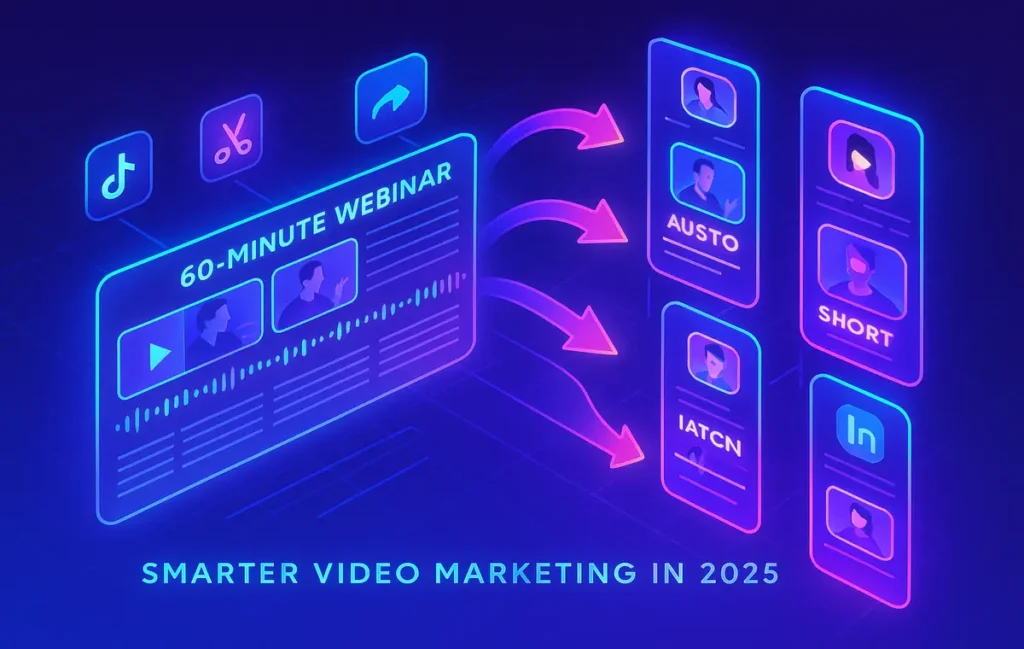
Your webinar may run sixty minutes, but today’s audience often gives you sixty seconds. The gap between long-form teaching and short-form attention isn’t a dead end—it’s the biggest distribution opportunity of 2025. By systematically converting your webinars into snackable, branded micro-videos, you multiply reach, keep your best ideas alive on high-velocity feeds, and turn passive viewers into pipeline. The difference between an average webinar and an exceptional one is no longer the event itself—it’s the machine you build afterwards to clip, caption, and circulate the highlights across TikTok, Instagram Reels, YouTube Shorts, and LinkedIn.
💡 Nerd Tip: Think of the webinar as raw ore. The short videos are your refined gold.
👥 Context & Who This Is For
This guide is for marketers, creators, and brand teams who run webinars regularly and want that effort to travel far beyond the live session. If you’ve ever closed a webinar tab feeling like the content will fade in a shared drive, this is your playbook. It’s not a generic “cut clips” tutorial; it’s a distribution-first system that aligns creative decisions (what to clip), production moves (how to edit and caption with AI), and channel tactics (how to package for TikTok, Reels, Shorts, and LinkedIn). Throughout, we’ll tie back to broader strategy pieces like How to Repurpose Long-Form Video into Short Clips and One Video, Many Platforms so your webinar program plugs into a scalable video engine rather than ad-hoc edits.
📈 Why Webinar Repurposing Works in 2025
Short-form video has become the public square for attention. Audiences expect value in under a minute, and platforms reward it. When you atomize a webinar into crisp, context-complete shorts, you unlock several compounding effects. First, you expand discoverability: instead of one long asset that only existing subscribers will watch, you create dozens of entry points that search and recommendation systems can surface daily. Second, you improve retention because captions, motion, and tighter narratives minimize drop-off. Third, you boost ROI—every short clip gives your webinar a longer life, driving registrations for future events, building remarketing audiences, and fueling your Video Marketing Trends experiments.
There’s also a cultural shift: buyers prefer learning in micro-moments. The same insight that took two minutes to explain on a live webinar can be distilled into a 25–45 second “aha” that people save, share, and discuss. Done well, these shorts don’t cannibalize long-form—they prime curiosity. Many teams report their most successful webinar registrations come from short clips that tease a sharp point, then prompt the full replay or next live session.
💡 Nerd Tip: Don’t chase virality; chase clarity. When a clip lands a single idea cleanly, distribution takes care of itself.
🧭 The Workflow: Step-by-Step Repurposing, End-to-End
🔍 Step 1 — Identify Key Moments (The Story DNA)
Before you touch an editor, locate moments with inherent hook and payoff. Look for concise frameworks (“3-step method to…”), contrarian takes, audience Q&A where the tension is built in, live demos that trigger “I didn’t know you could do that,” and quotable one-liners that carry meaning without deep context. If you’re repurposing recorded webinars, skim the transcript to surface these themes quickly. Mark the timestamps and note the promise of each clip in one sentence—this becomes your on-screen headline and caption foundation.
A practical heuristic: if a segment passes the “stop scrolling” test in its first three seconds (a strong claim, a question, or a visual switch), it’s a candidate. If it requires two minutes of setup to make sense, it belongs in a longer highlight reel, not a 45-second short. As you iterate, draft a “clip taxonomy” for your brand: definitions, demos, frameworks, hot-takes, case-snippets, and FAQ answers. This accelerates selection the next time you run a webinar.
💡 Nerd Tip: Build a timestamp habit. During the live session, have a producer drop markers whenever chat spikes or speakers land memorable lines.
✂️ Step 2 — Trim with AI Editing Tools
AI-assisted editors have collapsed the distance between raw footage and publishable shorts. OpusClip specializes in auto-detecting high-retention segments, auto-punching to faces, and pacing cuts to maintain momentum. Descript lets you edit “like a doc,” cutting filler words and tightening phrasing by editing the transcript. VEED streamlines quick trims plus easy caption styling and brand kits. The goal isn’t to replace judgment—it’s to remove the mechanical friction so you can make more editorial decisions in less time.
For the first pass, let AI find candidates across the full webinar. For the second pass, apply human editorial taste: correct where the auto-cut rushed a key idea, split overlong finds into two smaller beats, and ensure each clip lands a single takeaway. Keep your “clip taxonomy” open; don’t ship five frameworks in a row—alternate styles to avoid feed fatigue.
💡 Nerd Tip: Keep rough-cut output higher than you need. You’ll publish the top 30–40% and archive the rest for future sequences or A/B tests.
💬 Step 3 — Add Captions & Branding (Retention + Recall)
Captions are not optional in 2025. Many viewers watch muted first, and captions carry them into the story. Use high-contrast text, burn-in for universal compatibility, and kinetic emphasis to highlight verbs and numbers. Branding matters too, but subtlety wins: a tasteful corner bug, consistent color palette, and an end-card with a single call-to-action maintain continuity without screaming “ad.” Tools like VEED’s brand kits or Descript’s templates help you standardize quickly.
Keep in mind the “reading rhythm.” If your captions update too fast, comprehension drops; too slow, and viewers get ahead of the speaker and scroll away. Aim for 1–2 lines at a time, anchored near the focal point of the frame. If your source audio is imperfect, run a quick AI enhancement pass to remove hums and balance levels—no amount of captioning saves inaudible insights.
💡 Nerd Tip: Front-load the value. Put the core claim in the first caption card to win the first three seconds.
📱 Step 4 — Format for Each Platform (Native by Default)
Vertical is the default for TikTok and Reels, while YouTube Shorts also prefers 9:16. If you’re preparing a five-minute highlight reel for YouTube or LinkedIn, a horizontal or square edit may carry better context. Don’t just resize; re-compose. Use safe zones for captions and CTAs so UI elements don’t overlap. Test two thumbnail strategies: a text-only hook versus a speaker frame with a bold phrase. Shorts are “thumbnail-light,” but the first frame still acts like a cover—make it work.
Platform culture matters. TikTok rewards brisk pacing and curiosity gaps; Reels values polish and lifestyle resonance; Shorts sits in the middle with education-forward clips; LinkedIn wants professional clarity with business impact. You’re not “posting the same clip everywhere”—you’re tailoring the same idea into the dialect each platform understands.
💡 Nerd Tip: Export master captions as SRT/VTT and burn-in a stylized version; use the sidecar files where a platform supports them to preserve crispness.
🚚 Step 5 — Distribute with AI Scheduling (Cadence You Can Sustain)
The difference between a repurpose experiment and a channel flywheel is distribution discipline. AI-assisted schedulers like Buffer’s AI, Hootsuite’s AI distribution, or Lately.ai can stage clips over weeks, optimize post times by audience, and auto-recycle top performers. Create “release waves”: week 1 (top five clips), week 2 (FAQ and demo moments), week 3 (contrarian takes), week 4 (compilation + reminder for the next live webinar). Intelligent pacing beats a one-day dump.
To close the loop, integrate your distribution calendar with your Building a Video Marketing Funnel plan. When a user saves or shares a short, the CTA should lead to the full webinar replay, a lead magnet, or the next registration page. Treat clips as both reach and retargeting assets, and document which angles drive the most registrations to inform your next webinar outline.
💡 Nerd Tip: Build a two-track cadence—one feed for fresh clips, one for “evergreen re-surface” where proven winners return every 30–60 days.
🎥 Don’t Let Webinars Collect Digital Dust
Turn each 60-minute session into 12–24 platform-native shorts with AI cutting, captions, and smart scheduling. Faster reach, stronger recall, multi-channel momentum.
🧰 Best-Fit Tools for Webinar-to-Shorts (Editorial Uses, Not Just Features)
OpusClip shines when you need to mine long webinars at scale—its automatic highlight detection offers a strong first pass, then you refine. Descript is a dream for teams that want transcript-first editing and tight control over filler removal. VEED is ideal for fast caption design and brand consistency across dozens of clips. StreamYard or Restream earn their keep before repurposing even starts—clean multi-track recordings, dynamic layouts, and guest isolation make your later cuts dramatically cleaner.
Pick the stack by your bottleneck. If selection is slow, start with OpusClip. If polishing is slow, add Descript’s transcript workflow. If brand packaging is inconsistent, standardize in VEED. For teams juggling multi-channel posting, pair clips with an AI scheduler and keep your core library synchronized to prevent duplicate posting during the same 24-hour window.
💡 Nerd Tip: Build once, export many. Keep a master project per webinar with sequences for TikTok/Reels/Shorts/LinkedIn, so one change cascades to all.
🛰️ Distribution Playbook: TikTok, Reels, Shorts, LinkedIn
TikTok & Reels reward “hook-first” structure and kinetic energy. Lead with a bold claim or a counterintuitive lesson from the webinar. Keep jump cuts tight, animate captions lightly, and end with a soft CTA that promises the next step (“Full breakdown in the replay”).
YouTube Shorts favors education in the first line. Think “Here’s why your onboarding flow loses 40% of new users.” Maintain a slightly slower pace than TikTok, and consider pinning a comment linking to the full session.
LinkedIn responds to professional clarity. Give a clear context sentence in your caption (“From our onboarding webinar last week:”) and tie the insight to a business outcome. Finish with a question to invite discussion.
Tie every platform move to your broader Video Marketing Trends strategy. Shorts feed discovery; LinkedIn nurtures authority; all of them pour into your next webinar or replay. Your Top Video Content Ideas for Social Media Marketers list becomes your editorial calendar for which ideas to highlight next.
💡 Nerd Tip: Track “first 3 seconds hold,” “watch time to 50%,” and “saves + shares”—they predict which clips deserve paid amplification.
🧪 Benchmarks, Lift & What “Good” Looks Like
Expect a ramp, not a spike. For many teams, the first month establishes visual language and cadence; the second month compounds via saves and shares. A pragmatic target for early programs is to convert one 60-minute webinar into 12–24 clips, post 3–5 per week, and aim for 20–40% lift in overall video impressions over eight weeks. More important than raw views: watch time and qualified traffic to your funnel. A short that drives replay sign-ups or next-webinar registrations is doing the heavy lifting your long-form alone cannot.
Create a lightweight scorecard: hook effectiveness (scroll-stop rate), retention to 50% (message clarity), completion rate (pacing), and CTA follow-through (offer-message fit). Let that scorecard, not vanity metrics, guide your next outline and your next cut.
💡 Nerd Tip: Clip volume without editorial standards leads to noise. Hold a weekly “edit room” review to protect quality.
🧱 Challenges & How to Beat Them
Low visual/audio quality: run an AI enhancement pass before you clip. Clean inputs multiply downstream performance. If the original layout crops faces awkwardly in vertical, rebuild with picture-in-picture or speaker-centered crops.
Clips feel dry: layer story captions that complete a thought beyond the transcript (“This 10-second tweak fixed our drop-off”) and add minimal B-roll or screen grabs at the beat where attention dips.
Time burden: batch everything. Mark timestamps during the live session, block one edit sprint for AI rough cuts, and one packaging sprint for captions/branding.
Off-brand presentation: lock brand kits (colors, fonts, bugs, CTA end-cards) in your tool of choice and gate publishing behind a quick brand check.
If you’re scaling beyond one webinar, stitch this flow into your One Video, Many Platforms system so every flagship video—webinar, keynote, or product demo—feeds the same distribution machine.
💡 Nerd Tip: When in doubt, shorten. If a clip works at 52 seconds, test a 38-second cut with a tighter claim.
🔮 The Future: AI Auto-Highlighting & Predictive Clip Scores
The next leap is upstream intelligence. Auto-highlighting will get better at understanding emphasis, audience reactions (chat spikes, emoji bursts), and semantic novelty to suggest clips you would have picked by hand. Predictive models will score segments before you publish, flagging which cuts will retain better on Reels versus Shorts based on millions of performance patterns. Distribution tools will line up those bets with send-time optimization and audience segmentation so the right version of a clip meets the right viewer at the right moment.
As this matures, your creative leverage shifts again—from “what should we cut?” to “what should we say next time knowing which ideas travel?” That feedback loop is where brands compound results month after month.
💡 Nerd Tip: Keep your raw recordings organized and labeled. Tomorrow’s models will extract more value from yesterday’s content than you can imagine today.
🧪 Mini Case Study: SaaS Webinar to 20 Shorts → 3× Reach
A mid-market SaaS hosted a 60-minute onboarding webinar. Within 48 hours, the team pulled 22 candidate clips via OpusClip, polished 14 in Descript, and packaged them with VEED brand kits. Over four weeks, they staged a drip sequence: TikTok and Reels for hooks, Shorts for the frameworks, and LinkedIn for business outcomes. Each clip routed to a replay landing page and the next live session. The result: 3× reach versus the prior month’s long-form-only strategy, a 27% increase in replay sign-ups, and a measurable lift in demo requests tied to LinkedIn shorts that framed ROI outcomes. The webinar itself didn’t change—the distribution engine did.
🧩 Troubleshooting & Pro Tips
Clip Quality Checklist (use before publishing):
– Does the first caption card deliver the promise in under three seconds?
– Is the core point resolved by the 20–35 second mark?
– Are captions readable on a phone at arm’s length?
– Is there a single next step at the end?
Platform Tuning Notes:
– TikTok: fastest pacing, visual switches every 1.5–2.5 seconds.
– Reels: slightly smoother pacing, aesthetic polish matters.
– Shorts: education-forward hooks; pin context in comments.
– LinkedIn: headline clarity + business outcome in caption.
Common Fixes:
– Low engagement on TikTok → tighten the open, cut preamble, test a curiosity gap (“Most onboarding fails here—watch”).
– Watch-time drop at 5–7 seconds → add a mid-clip beat change (zoom/pattern break).
– Off-brand feel → re-apply brand kit; ensure end-card color and CTA voice match your Building a Video Marketing Funnel offer.
🔗 Integrations That Save Hours
Your editing decisions gain power when they’re wired to distribution. With an AI scheduler, you can pipeline clips to TikTok, Reels, Shorts, and LinkedIn on a rolling cadence while A/B testing hooks. Pair this with your analytics to detect which clip archetypes generate the most replies or saves, then design your next webinar to produce more of those moments. If your team also runs newsletters or blog recaps, recap the best shorts weekly and embed them—your short-form fuels long-form and vice versa. For bigger strategy, anchor this flow to Building a Video Marketing Funnel so every micro-video advances a macro goal.
💡 Nerd Tip: Keep a “clip ledger” (title, promise, platform format, publish date, KPI snapshot). It’s your control room for compounding wins.
Want More Smart AI Video Tips?
Join our free newsletter for weekly breakdowns on webinar workflows, AI editing stacks, and short-form distribution strategies—built for teams that ship.
100% privacy. No noise. Just value-packed insights from NerdChips.
🧠 Nerd Verdict
In 2025, the best webinars are the ones that keep living. When you treat the live session as source material rather than a one-off event, you build a sustainable engine: ideas become shorts, shorts become discovery, discovery becomes registrations, and registrations cycle back into stronger source content. This is how brands compound authority without burning teams out. If you’re serious about reach and recall, the webinar-to-shorts workflow isn’t a nice-to-have—it’s the backbone of modern video distribution. NerdChips sees the same pattern across high-performing teams: consistency of clipping, ruthless editorial clarity, and disciplined multi-channel release.