🚀 Intro: From Interface to Intelligence
Operating systems have always been the beating heart of our computers—but from 2025 onward, they’ll become something more ambitious than a graphical shell and a file tree. As AI moves from “an app you open” to “a capability that’s everywhere,” the OS itself turns into an adaptive co-pilot: it sees context, predicts needs, secures your environment, and orchestrates workflows before you even click. Menus and windows won’t disappear, but they’ll be joined by a new, invisible layer of intelligence that quietly routes your attention to the next best action. If yesterday’s OS was a map, tomorrow’s is a guide.
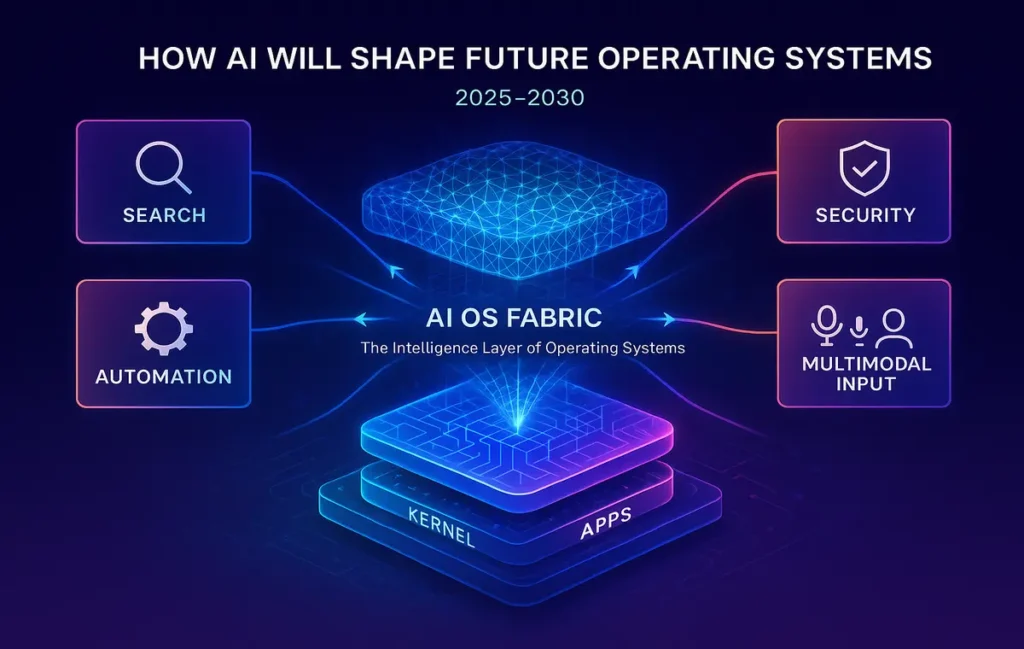
💡 Nerd Tip: Don’t imagine “AI in the OS” as a single feature. Picture a fabric stitched through search, settings, security, files, notifications, automations, and even UI rendering.
👥 Context & Who This Is For
This outlook is written for developers, product leaders, power users, and curious technologists who want to understand what an AI-first operating system really looks like. It’s not a tour of any one company’s roadmap; it’s a cross-platform vision of where macOS, Windows, Android, Linux, and emerging spatial systems converge. If you’ve followed pieces like On-Device AI Race or The Future of Work on NerdChips, consider this the OS-level chapter: how intelligence becomes native, how user experiences become predictive, and how privacy and personalization get reconciled under one roof.
🧬 The AI-Driven Evolution of Operating Systems
We’ve crossed several interface epochs: command line to GUI, desktop to mobile, then cloud-first. The 2025–2030 era is AI-first. That doesn’t mean the command line vanishes or the desktop goes away; it means every OS primitive—search, file I/O, notifications, window management, power settings—gets a reasoning layer. Instead of the user adapting to rigid workflows, the OS adapts to the user’s intent in real time.
Consider the trajectory we’re already seeing. Search is no longer a string match; it’s a semantic question that returns the right artifact—document, setting, API call, or a generated summary. System settings stop being a maze and become a dialogue: “Reduce battery drain on flights” becomes a config recipe the OS implements. Notifications evolve from pings into decisions: “Pause all but calendar-critical alerts during deep work blocks, then summarize at 5 p.m.” The OS becomes less of a tray of tools and more of a partner.
💡 Nerd Tip: Look for OS features that “collapse steps.” If something takes five clicks today and one natural-language request tomorrow, you’re seeing the AI shift.
🔮 Key Ways AI Will Shape Future OS (2025–2030)
🎯 Predictive UX: The Right Thing at the Right Time
Predictive UX means your OS anticipates tasks before you ask. As patterns of work repeat, the system recognizes precursors—plugging in a monitor, opening a specific repo, joining a Monday standup—and preps your environment: windows tiled, VPN engaged, notes surfaced, microphone noise suppression tuned. This isn’t “creepy” when done right; it’s consent-driven, local-first modeling that learns routines and offers gentle nudges rather than hard overrides.
For creatives, predictive UX might stage your color profile and GPU mode when you open a 3D scene. For analysts, it might extract last week’s queries and propose an updated dashboard at login. For students, it may shift the UI to distraction-free for a timed study block. Once predictive UX feels reliable, it becomes the background rhythm of computing—an invisible productivity dividend.
💡 Nerd Tip: Pair predictive UX with explicit scene cards (“Focus,” “Collab,” “Present”). Let the OS learn your versions of each and switch you faster than any manual tinkering.
🤝 Native AI Assistants: Beyond “Open App” to “Do Work”
AI assistants embedded at the OS layer will progress from answering questions to performing sequences. Think less “Siri, what’s the weather?” and more “Draft a project brief from yesterday’s meeting notes, file it in the client’s workspace, and schedule a review.” Because the assistant is native, it has permissions to span apps, files, and settings through standardized intents—securely, with transparent prompts and dry-runs before execution.
The real unlock is agentic orchestration: chaining capabilities like summarizing a PDF, creating a task list, scheduling with constraints, and opening the exact resources you’ll need. A mature OS assistant will show its plan, cite sources (local and cloud), and ask for confirmation at smart checkpoints. It’ll also remember your stylistic preferences—tone for emails, formatting for docs—and apply them consistently.
💡 Nerd Tip: Treat your OS assistant like a junior operator. Give it checklists for repeatable tasks (“publish blog draft,” “ship release notes”) and watch error rates drop.
🧩 Personalized Workflows: Context-Aware Everything
Personalization moves past themes and shortcuts into stateful context. The OS knows which project you’re in, which teammates are relevant, what you last changed, and which deadlines loom. File systems stop being purely hierarchical; they become intent-indexed: “the contract we negotiated last quarter,” “the slide with the new pricing,” “the clip where the PM explained scope creep.” Smart notifications defer until you exit a critical path. Window management becomes semantic: “pin docs that I reference in this meeting” or “tile code left, logs right, diff bottom.”
The effect is that you start thinking less about where your work lives and more about what your work is. Apps remain crucial, but the OS connects their outputs into living workflows. For many power users, that shift alone is worth a double-digit productivity bump.
💡 Nerd Tip: Name your workflows in plain language (“Quarterly Review Mode”). The OS can then bind triggers and resources to those labels reliably.
🛡️ Adaptive Security: From Walls to Watchfulness
Static rules don’t keep up with modern threats. Adaptive security models will use anomaly detection to spot risky behavior—sudden exfiltration, credential misuse, sideloaded drivers—then respond proportionally: isolate a process, revoke a token, challenge with passkey, or roll back a change. Crucially, this doesn’t mean more nagging. It means fewer prompts, higher signal—the OS intervenes when the pattern genuinely deviates from your norms.
On consumer devices, on-device models flag suspicious Bluetooth pairings or spoofed captive portals. In enterprises, OS policy engines get an AI copilot: “Show me machines with unusual PowerShell activity in the last 24 hours, quarantine the riskiest five, and open an incident with a summary.” Security gets faster, not louder.
💡 Nerd Tip: Favor OS features that explain why they intervened and how to reproduce the decision. Transparency builds trust—and helps you tune sensitivity.
🗣️ Voice & Multimodal Interfaces: Talk, Show, Point
The most natural interface is the one that understands your intent from words, context, and screen content. Multimodal assistants will “see” what you see: “Convert this table to a CSV and mail it to Alex,” said aloud while a spreadsheet is open; “Tighten these three sentences,” while a doc is selected. Cameras and sensors—used responsibly—assist with presence detection, gesture hints, and accessibility. Spatial OSes extend this to 3D contexts, referencing objects and scenes rather than windows and docks.
Because the model runs partly on device, latency drops and privacy improves. Dictation becomes durable for real work, not just quick notes. And with permissioned screen context, “what I mean” becomes computable.
💡 Nerd Tip: Keep a mental model of what your OS assistant can “see”—window focus, clipboard, selected text. Offer it the right context and it’ll feel magically precise.
⚙️ OS-Level Automation: Agents at the Kernel of Your Day
We’ve had macros and shell scripts for decades. The difference now is reasoning—the OS can route exceptions, recover from partial failures, and ask for help when edge cases hit. Automations become living flows: “When I join a Zoom with >5 attendees, switch to Focus scene, enable echo cancellation, open the brief, and record notes.” If the meeting moves from laptop to phone, the OS carries state and continues the routine.
The app model evolves accordingly. Apps expose intents (“transcribe,” “compress,” “annotate”) instead of only UIs. The OS composes those intents across vendors, so a single workflow spans your favorite editor, cloud share, and calendar without brittle glue code.
💡 Nerd Tip: Start writing automations in natural language first (“When X, do Y then Z”), then formalize them. You’ll discover edge cases faster.
🧪 AI + OS Integration in Action (2025 Snapshots)
We already see early contours of this future. On the Apple side, macOS 26 (Liquid Glass) pushes deeper semantics into Spotlight, blurring the line between system search and “do this for me” actions—something we covered in macOS 26 Released: Liquid Glass, Smarter Spotlight, and a Work-First Mac. Apple VisionOS 2 hints at spatial OS patterns where objects, scenes, and context become first-class citizens, foreshadowing multimodal agents that work in 3D—see Apple VisionOS 2 for that trajectory. On Windows, Copilot’s tighter OS integration turns shortcuts into intents—the assistant touches settings, apps, and files as a unified surface. Android’s predictive workflows show up in device-onboarding, notification triage, and context tiles that adjust to routine. Across platforms, the throughline is the same: intelligence is becoming a system service.
💡 Nerd Tip: Follow the On-Device AI Race: as NPU/GPU watt-per-TOPS improve, expect bigger models to live locally, shrinking latency and cloud dependency.
🧱 Challenges Ahead: Privacy, Trust, Bias, and Over-Automation
An AI-first OS must earn trust daily. Privacy is first-class: users should be able to keep sensitive modeling purely on-device, opt into cloud features explicitly, and see a data lineage—what was used, where it lived, and how long it persisted. Bias is a danger when assistants summarize or recommend. OS vendors will need robust evaluation, red-teaming, and visible feedback channels. Over-automation is another pitfall: if the system gets pushy or opaque, users will rebel. The best designs make reversal easy and explanations routine.
Finally, there’s the dependency risk. An OS that does too much “for you” can deskill users or collapse when models drift. Guardrails—approval points, audit trails, sandboxed intents—ensure agency stays with the human.
💡 Nerd Tip: Treat automation like cruise control: fantastic on straightaways, off in storms. Keep a manual override close.
🌅 Future Outlook (2025–2030): From Operating System to Adaptive Environment
Over the next five years, the OS will feel less like an app launcher and more like a personal runtime. A dedicated AI layer will sit beside the kernel, mediating between your intent and system capabilities. Files, apps, and settings remain, but they’re orchestrated by an understanding of context, goals, and constraints. For work, that means a move from “productivity OS” to adaptive work environment—your system reconfigures itself to the job at hand. For consumers, it means phones and computers that feel self-improving: new behaviors learned each month, fewer frictions, better outcomes.
Enterprise IT will standardize on policy-aware assistants with scoped permissions. Consumer devices will ship with on-device models capable of privacy-preserving summaries, translation, and vision tasks. And spatial OSes will normalize pointing and speaking to things rather than windows. If there’s a unifying metaphor for 2030, it’s this: the OS is no longer a place—it’s a partner.
💡 Nerd Tip: Design your stack with composability in mind. The more your tools expose intents and APIs, the more your OS can automate meaningfully.
Ready for the AI-First OS Era?
The next OS you install may be less about menus and more about intelligence. Explore on-device AI stacks and automation builders to get ahead of the curve.
🧑💻 Mini Case Study: A Power-User’s 30% Workflow Lift
A product manager running Windows on a hybrid team mapped their daily routines into an OS-native assistant. Morning focus scene turns on do-not-disturb, tiles yesterday’s notes and today’s roadmap, and mounts the correct dev container. Meeting scene auto-enables beamforming mic, launches the agenda, and starts an on-device transcript with action-item extraction. After lunch, a “review” scene pulls pull-requests requiring attention and suggests calendar slots for deep work based on historical context. Over six weeks, their cycle-time for spec writing and review dropped by roughly a third—not from typing faster, but from context switching less. The OS became the conductor.
💡 Nerd Tip: Improvements stack. Save 90 seconds in ten transitions a day and you’ve reclaimed fifteen minutes—every day.
🛠️ Troubleshooting & Pro Tips
If privacy is your concern: prioritize local-first features and give the assistant narrow scopes. Keep sensitive corp data in on-device indexes and use passkeys for any cross-device sync. Pair this with the practices we outlined in AI-Powered Productivity Hacks to maintain velocity without leakage.
If suggestions feel noisy: tune or disable categories, then re-enable slowly. Train your OS with explicit feedback—“Not helpful,” “Remind me next week,” “Always do this in Focus scene.” The fastest way to a calm system is ruthless pruning plus a few high-value automations.
If automation breaks on edge cases: move from opaque flows to explainable chains. Ask the assistant to show its plan, set confirmations at decision branches, and log outcomes. Over time you’ll harden the routine and raise trust.
If performance lags: check NPU/GPU schedules and background indexing. On-device AI competes for resources; well-designed OS schedulers will defer heavy inference during active foreground work.
💡 Nerd Tip: Teach your OS vocabulary. Phrases like “ship the weekly brief” or “spin up research mode” should map to rich routines you own.
🧭 Comparison Notes & Where to Dive Deeper
This is a broad, cross-platform outlook on AI-native operating systems. If you’re researching specific platform upgrades, our deep-dives on macOS 26 Released: Liquid Glass, Smarter Spotlight, and a Work-First Mac and Apple VisionOS 2 show concrete patterns taking hold. For the silicon story and why local models matter, revisit On-Device AI Race. And to translate OS intelligence into everyday wins, pair this with AI-Powered Productivity Hacks and The Future of Work—they’re the natural companions to this vision.
Want More Smart AI Tips Like This?
Join our free newsletter and get weekly insights on on-device AI, automation, and the future of operating systems—practical, privacy-aware, and builder-friendly.
100% privacy. No noise. Just value-packed content tips from NerdChips.
🧠 Nerd Verdict
From 2025 to 2030, operating systems will graduate from passive hosts to active collaborators. The winners won’t be those with the flashiest desktops, but those that turn context into action, privacy into default, and automation into something anyone can trust. NerdChips’ take: the AI layer won’t erase the OS you know—it will elevate it, transforming routine into ritual and complexity into quiet momentum.
❓ FAQ: Nerds Ask, We Answer
💬 Would You Bite?
If your next OS could predict and stage your daily workflows, would you let it automate most of the routine—or keep manual control and approve each step until trust is earned?
Crafted by NerdChips for creators and teams who want their best ideas to travel the world.