🤖 Intro: Consistency Without the Chaos
Posting manually is a tax on your attention. You stop what you’re doing, resize a thumbnail, paste a caption, guess a time, and hope it lands. In 2025, you can replace that anxiety loop with a repeatable automation workflow: a system that plans your content, schedules it across channels, optimizes send times with AI, and loops in repurposing so every idea travels farther with less effort. The goal isn’t to turn your brand into a bot; it’s to free your brain to create. With the right setup, your queue stays full, your analytics improve, and you never scramble at 9:03 p.m. again.
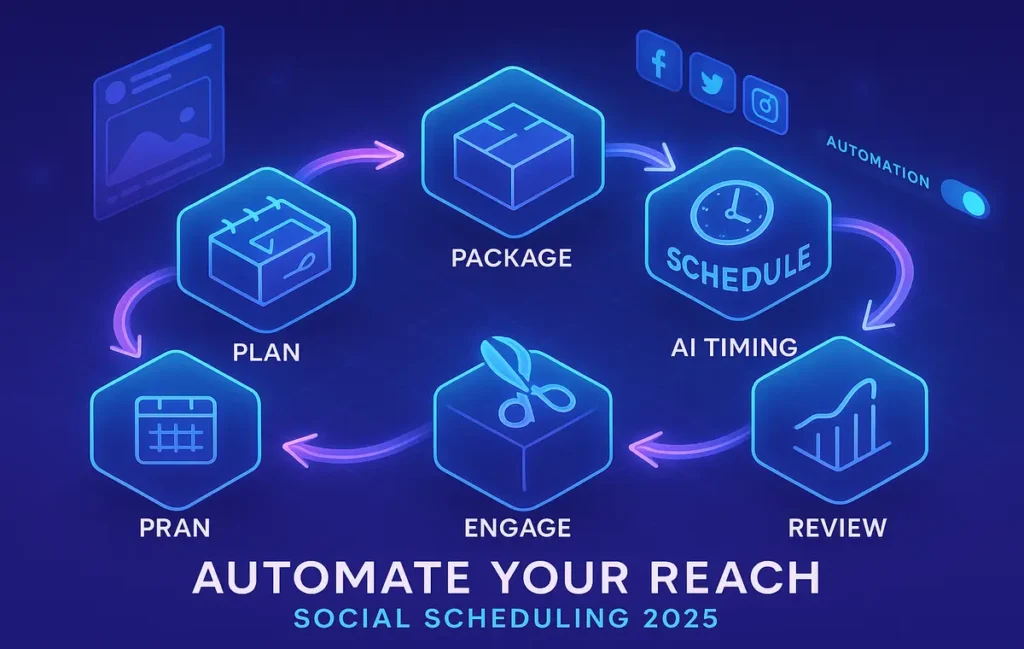
💡 Nerd Tip: Treat scheduling like a supply chain: ideation → production → packaging → distribution → feedback. Automate every handoff you can.
🎯 Context & Who This Is For
This guide is for creators, solopreneurs, and lean marketing teams that need reliable output without hiring a full-time coordinator. It’s not a “list of tools.” It’s a how-to, start-to-finish workflow that works whether you ship three posts a week or thirty. We’ll connect strategy to execution, templates to queues, and analytics to iteration—so you can scale quality and quantity. If you want an overview of the tool landscape, check Top Automation Tools for Social Media Scheduling Across Multiple Platforms and Top Social Media Management Software for Brands. If you’re ready to build, keep reading.
🌍 Why Automating Social Media Scheduling Matters
Automation solves three problems: consistency, time, and bias toward creation. Consistency wins the algorithm—steady, relevant posting beats bursts of genius followed by silence. Time is obvious: scheduling a week’s content in one sitting unlocks deep work for the rest of the week. And bias toward creation matters because your limited energy should go to writing, filming, and engaging—not menu-diving. Automated scheduling also unlocks global reach: AI timing picks the best windows per region and platform, so a single video can reach night owls in LA and early birds in Berlin. Finally, analytics become trustworthy when your process is consistent; patterns emerge, optimizations stick, and your effort compounds.
💡 Nerd Tip: Automation is not abdication. You still write like a human and show up in comments. The robots just carry the boxes.
🗺️ Step 1: Define Your Content Calendar (Make Planning Frictionless)
Start with a calendar that reflects your content pillars—the recurring themes your audience expects. For a fitness creator, pillars might be “workouts,” “nutrition,” “mindset,” and “community.” For a SaaS brand, think “product,” “customer stories,” “education,” and “culture.” Put pillars on a weekly cadence so your queue always knows what to pull next. Use a tool that you’ll actually open daily: Notion for flexible databases, Trello for Kanban simplicity, or an AI planner that drafts starter outlines.
In Notion, a simple database with properties—Platform, Pillar, Status, Publish Date, Media, Caption Draft, CTA, and Repurpose Source—is enough. Every new idea starts as a “Draft.” When it earns a slot, you set the Publish Date and Platform(s). That record becomes the single source of truth. If you prefer AI assistance, plug in a planning agent to propose weekly lineups based on last month’s performance. The planner drafts subject lines, hook options, and thumbnail text; you approve and refine, not reinvent.
💡 Nerd Tip: Name each week with a theme (“Onboarding Week,” “Community Wins,” “Q&A Push”). Themes reduce decision fatigue and keep visuals cohesive.
🧰 Step 2: Choose the Right Automation Tool (Fit to Your Team and Channels)
Pick a scheduler that matches your reality. Buffer AI shines for solo creators and small teams who want clean queues, AI-assisted timing, and straightforward analytics. Hootsuite scales across larger teams with permissions, approvals, and deeper reporting. Later makes visuals and Instagram-first workflows smooth, with decent multi-platform support. Publer balances value and features, including evergreen recycling and bulk uploads. Metricool offers robust analytics and competitive benchmarking that help you iterate.
The right tool is the one that integrates your calendar and assets, supports all your target channels (Instagram, TikTok, LinkedIn, X, YouTube Shorts), and has AI timing plus bulk operations. Check for essentials: platform-native features like IG Stories scheduling, first comment support, UTM auto-tagging, multi-image carousels, and Shorts/Reels metadata handling. If you run approvals, ensure team roles and content lockers are baked in. You can always explore alternatives in Top Social Media Management Software for Brands, but decide fast; perfectionism delays scale.
💡 Nerd Tip: If you’re one person posting to many channels, prioritize bulk actions (bulk upload, multi-queue pushes) over bells and whistles.
🔗 Step 3: Connect All Platforms (Reduce Friction to Zero)
Once your tool is selected, connect every channel you intend to use for the next 90 days. Authenticate Instagram (Feed, Reels, and Stories if supported), TikTok, LinkedIn Pages, X, and YouTube Shorts. Verify permissions, confirm thumbnail handling, and test a dummy post (saved as draft) per platform to ensure captions, line breaks, tags, and mentions render correctly. Map your default queues: for example, Reels at 11:30 and 17:30 local time, LinkedIn at 08:45 weekdays, TikTok at 20:15 daily. Good schedulers let you create these queue slots once; future content snaps into place automatically.
Double-check brand assets—logo lockups, color presets, caption templates, and hashtags—live in your scheduler’s content library. If your tool supports it, build caption templates for each platform’s voice—formal for LinkedIn, high-energy for TikTok, concise for X. Create saved UTM profiles so outbound links tag themselves consistently for analytics. The fewer clicks between “idea” and “queued,” the more you’ll publish.
💡 Nerd Tip: Use platform-specific line-height helpers (like invisible characters) in templates so captions break the way you intend on each app.
🧠 Step 4: Create Smart Posting Workflows (Queue Once, Publish Everywhere—Properly)
A smart workflow starts with AI timing. Most modern schedulers predict optimal times per platform based on your historical engagement and audience behavior. Turn this on. Your job is to supply a content supply, not to hand-pick timestamps. Next, embrace bulk upload. Shoot or design in batches, export to a structured folder, and upload 10–20 assets at a time. Assign pillars and platforms in one pass, then polish captions.
For evergreen content, enable recycling with guardrails. Tutorials, FAQs, and value posts can return every 30–90 days with updated hooks or covers. Create a “When Queue Is Empty” fallback that pulls from your evergreen pool to prevent dry spells. If your tool supports first comment posting, prefill hashtags there for Instagram and branded links for LinkedIn. Keep visuals platform-native: vertical 9:16 for Reels/TikTok/Shorts, square or 4:5 for IG feed, and horizontal thumbnails for YouTube. The scheduler should handle auto-resizing or at least warn you when ratios mismatch.
Finally, add approval steps only where they add value—client accounts, regulated industries, or large teams. Otherwise, trust your templates and publish cadence. The line between “quality control” and “bottleneck” is thin; optimize for speed with minimal, high-signal checks.
💡 Nerd Tip: Write hooks separately from captions. Test 2–3 hook variants per video across platforms; let analytics kill the weak ones.
🔁 Step 5: Integrate Repurposing (One Idea, Many Formats)
Repurposing turns long-form into multi-platform fuel. A 10-minute video can produce a week of clips; a blog post can become a LinkedIn carousel, a Twitter thread, and a shorts script. Use an AI-assisted editor to identify high-retention moments (cuts with strong starts, moments of surprise, or visually focused segments). Convert these into reels and shorts with baked-in captions and subtle branding. For text, distill key points into carousel slides and snackable quotes. Tie this directly into your scheduling tool: export assets into a “To Queue” folder the scheduler watches, or push via native integrations when available.
When the loop is tight, repurposing becomes part of creation. Draft your long-form with the shorts in mind: explicit chapter markers, call-outs that stand alone, and clean visuals for vertical crops. For a deeper system, align with How to Automate Content Planning with AI Tools and Repurposing Content so ideation feeds production and production feeds distribution without manual shuffling.
💡 Nerd Tip: Always add a native CTA per platform—“save for later” on Instagram, “subscribe” on YouTube, “follow for Part 2” on TikTok, “DM me ‘guide’” on LinkedIn.
📈 Step 6: Monitor & Optimize (Metrics That Matter)
Automation without feedback is just noise. Review performance weekly and run a 30-minute retro: what hooked, what fell flat, and why. Prioritize engagement rate (interactions per impression), watch time/retention curves for video, and CTR for link posts. Track conversion proxy metrics like saves and shares; they correlate with algorithmic reach. If your scheduler offers AI-driven analytics, enable recommendations that adjust queue times, suggest formats that index well on each platform, and flag underperforming hooks.
Tie analytics to hypotheses: “Two-hook intros outperform single hooks on Reels,” “Questions outperform statements on LinkedIn,” “Weekend posts tank for B2B.” Change one thing at a time for a week; let the data decide. For video-heavy workflows, pair this with Instagram Reels Analytics to catch retention dips and refine opening seconds. The beauty of a consistent schedule is that small tweaks become visible quickly.
💡 Nerd Tip: Look beyond averages. A post with lower engagement but high saves might be your sleeper hit for long-term reach.
🧪 Pro Workflow Example: 1 Week of Content in 2 Hours (Solo Creator)
A solopreneur in the productivity niche runs this exact loop every Monday morning:
-
Plan (15 min): In Notion, the creator picks four pillars for the week and sets a theme (e.g., “Focus Systems”). The AI planner drafts five hook options per post.
-
Produce (35 min): Record two 5–7 minute videos with explicit chapter markers. Export, then auto-generate five short clips with burned-in captions and brand kit.
-
Package (30 min): Write platform-specific captions and CTAs, assemble one LinkedIn carousel from the blog outline, and generate thumbnails.
-
Schedule (25 min): Bulk-upload into Buffer AI, assign queues, apply AI timing, set first comments and UTM profiles, and enable recycle for one evergreen post.
-
Engage (15 min daily): Reply to comments during a scheduled window using the scheduler’s unified inbox, then step away.
Outcome: five to seven platform-appropriate posts per week across Instagram, TikTok, LinkedIn, X, and YouTube Shorts—consistently—without daily context switching.
💡 Nerd Tip: Cap your Monday session. Parkinson’s law kills consistency. Done is better than tweaked forever.
⚡ Stop Stressing—Start Scheduling Smart
Build a weekly automation loop with AI timing, bulk uploads, and evergreen queues. Publish more—with less effort—and keep your voice human.
🧩 Mini-Table: Tools by Use Case (Indicative)
| Use Case | Best Fit |
|---|---|
| Solo creator, simple queues, AI timing | Buffer AI |
| Team approvals, multi-brand governance | Hootsuite |
| Instagram-first visuals + linkin.bio | Later |
| Budget-friendly + evergreen recycle | Publer |
| Deep analytics + competitor tracking | Metricool |
(Use this as a compass; your stack can mix tools. Start lean.)
Social automation works best when it’s part of a structured workflow, not just a posting queue. This workflow automation guide for business teams explains how to connect content, timing, and approvals into one system.
🧪 Mini Case Study: From 2 Posts/Week to 10 (Small Ecommerce Brand)
A two-person ecommerce team sold home office accessories. They posted twice weekly when time allowed, with unpredictable results. They adopted Later for scheduling, created a Notion content board with pillars (Product Features, Customer Setups, Tips, Offers), and shot one hour of footage every Thursday. Clips were batch edited into Reels and Shorts; hero images were designed for carousels. With AI timing enabled and a small evergreen pool, their output jumped to 10 posts per week across four platforms. Within six weeks, they saw a 38% lift in weekly reach, a 22% increase in saves on tutorials, and a measurable uptick in email signups attributed via UTMs. Most importantly, the founders stopped dreading social; they created once, scheduled once, and spent their energy replying to customers.
💡 Nerd Tip: Saves and replies are your best early indicators. Sales lag; dialog leads.
🛠️ Troubleshooting & Pro Tips
If platform algorithms shift, lean on adaptive timing and your own retention data. When a queue runs dry, don’t panic—repurpose: pull top-performing posts from 90 days ago and refresh the hook, cover, and CTA. If automation starts to feel impersonal, add micro-stories to captions: the lesson you learned, the mistake you made, the behind-the-scenes moment. For teams, limit approval steps to legal/brand-sensitive posts; everything else should ship with template-based guardrails. And always sanity-check previews—line breaks, mentions, hashtags, and thumbnails—before finalizing the week.
💡 Nerd Tip: Create a “Bad Day” folder—15 evergreen bangers ready to drop when production slips. Consistency beats novelty on those weeks.
🧱 Quick Checklist: Your 7-Part Scheduling Workflow
-
Plan weekly pillars and themes in a content calendar.
-
Produce in batches with platform-native ratios in mind.
-
Package with captions, thumbnails, UTMs, and first comments.
-
Schedule via AI timing and default queues; enable recycling for evergreen.
-
Repurpose long-form into clips, carousels, and threads.
-
Engage during fixed windows; keep it human.
-
Review weekly analytics; change one variable at a time.
📬 Want More Smart AI Tips Like This?
Join our free newsletter for weekly playbooks on content automation, AI planning, and analytics—designed for creators and lean teams who want compounding results.
🔐 100% privacy. No noise. Just value-packed content tips from NerdChips.
🧠 Nerd Verdict
Automation isn’t about posting more for the sake of more. It’s about building a trustworthy machine that carries your best ideas to the right people at the right times—without you living inside five apps all day. A weekly plan, AI timing, bulk uploads, evergreen recycling, and a short analytics retro turn chaos into cadence. From the NerdChips point of view, the brands that win in 2025 aren’t the ones that shout the loudest; they’re the ones that ship steadily, repurpose smartly, and keep the human touch where it matters—conversation.
❓ FAQ: Nerds Ask, We Answer
💬 Would You Bite?
If one tool could schedule every channel with AI timing and first comments, would you invest in the paid tier—or ride the free plan until you hit its limits? What would tip you over? 👇
Crafted by NerdChips for creators and teams who want their best ideas to travel the world.